AI Prompt Studio: build clearer prompts and see what is missing before you send them
AI Prompt Studio turns what you want into a clear, structured prompt that you can paste into ChatGPT, Claude, Gemini or any other AI. You fill in the fields you know, and the studio assembles the prompt and scores it out of 100 across clarity, context, specificity, constraints and output, with a plain tip for anything missing. There are builders for fifteen kinds of work and a library of ready-made templates. It does not call any AI itself, so nothing you type is sent anywhere. You buy it once and receive an Android app that works offline and the web version to run on your own computer or website. You can try the same studio free on this website first.
What AI Prompt Studio does
Most disappointing AI answers start with a vague request. A good prompt says what the AI should do, who the result is for, what it needs to know, what to avoid and what shape the answer should take. The studio asks for each of those in turn, so you do not forget them, and tells you how complete your prompt is before you use it.
It is a builder, not a chatbot. It assembles your prompt from the fields you fill in, using fixed rules, and it works with whichever AI you prefer. You can try it free on this website. Buying gives you your own copy: an Android app and the web files to run on your own computer or site.
Who it is for
- Writers, marketers, students and small-business owners who use AI regularly and want better first answers.
- Developers who want a quick way to structure prompts for coding assistants, websites, Android apps and WordPress plugins.
- Ministry and church staff who use AI for sermon prep, studies and devotionals and want a consistent way to ask.
Who it is not for
- Anyone who wants an AI chatbot or an app that writes the answer for them: the studio builds the prompt and you paste it into the AI you use.
- Anyone who wants prompts saved in the cloud and synced between devices: saved prompts stay on one device.
- Anyone who expects the score to guarantee a good AI answer: it measures how complete your prompt is.
How it works
Choose a builder, fill in what you know, read the score, copy the prompt.
Choose a builder
Start from the Universal Builder or pick one for your kind of work, such as Writing, SEO, Website Development, Image Generation or Christian Content. Each adds the fields that matter for that work.
Fill in what you know
Objective, task, background, audience, platform, tone, output format, constraints and expected result. Only the task is required. Leave the rest blank.
Generate and read the score
Press Generate prompt. The studio builds the prompt and scores it out of 100, with a bar for each of clarity, context, specificity, constraints and output, and a tip for each weak area.
Refine, copy or save
Use Improve structure, Expand or Shorten if you like, then Copy the prompt into your AI, download it as a text file or save it on your device.
The score reads your prompt with fixed rules. A one-line task scores low and a complete brief scores high, so you can see the difference your extra detail makes.
Features
This is what the studio does today. Nothing here is a roadmap item.
Fifteen prompt builders
A universal builder plus builders for writing, SEO and marketing, websites, Android apps, coding with Claude Code, coding with Codex, WordPress plugins, image generation, video generation, business, books and publishing, Christian content, education and research, data analysis, and productivity and automation.
A quality score out of 100
Five parts, each out of 20: clarity, context, specificity, constraints and output, with a short tip for each part that is weak.
Improve, Expand and Shorten
Three buttons that rework your fields using fixed rules. They are rule-based, not AI, and the studio says so.
Ready-made templates
A library of ready-made prompts you can search, filter by category, preview and open in the builder with one click.
Copy, download and save
Copy the prompt, download it as a .txt file, or save it. Saved prompts are listed on the Saved page with copy and delete buttons.
Nothing is sent anywhere
The studio calls no AI service and needs no account or API key. Saved prompts live in your own browser or app on your device.
Light and dark themes
Switch with the button in the top bar.
Works on phone and computer
The Android app works with no internet connection. The web version works in any modern browser.
Walkthrough: from a one-line task to a complete brief
These are real screenshots of the studio. It is the same studio you receive, and you can try it for free on this website.
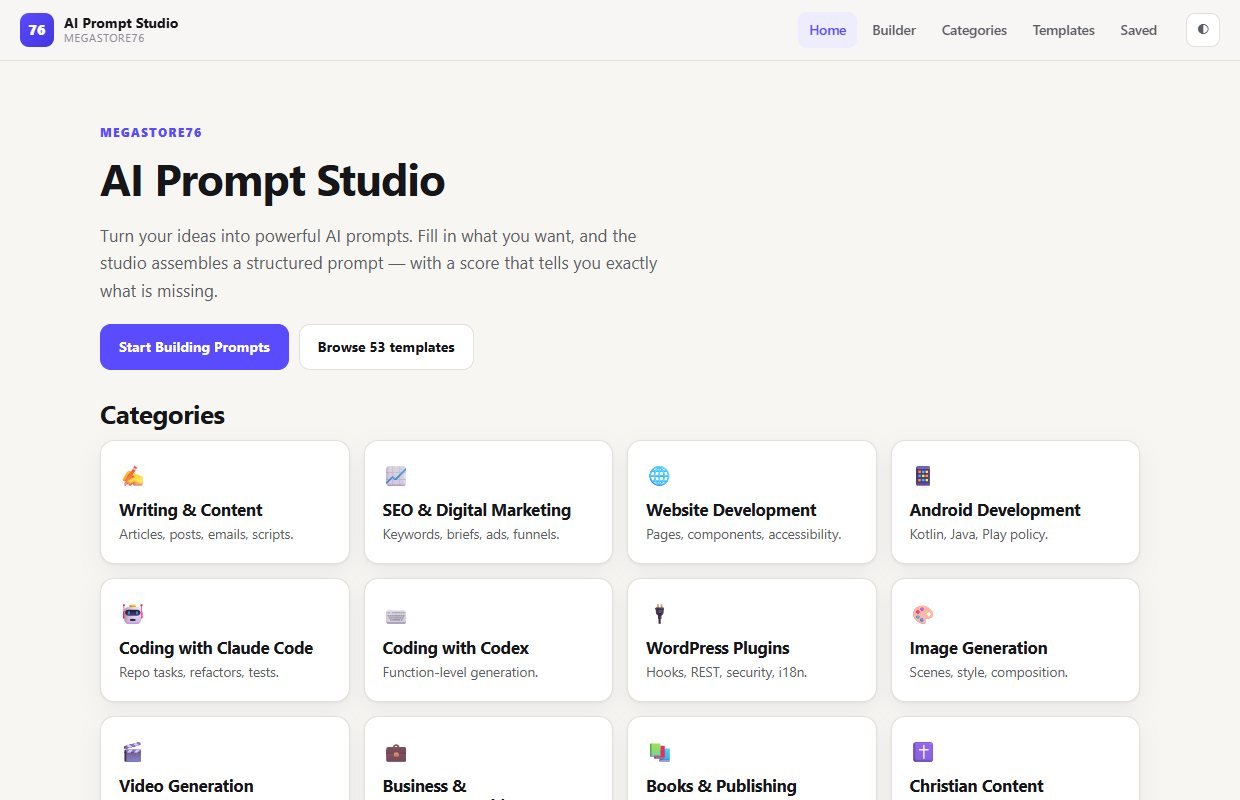
1Start here
The home page lists the categories, with buttons to start building or browse the templates.
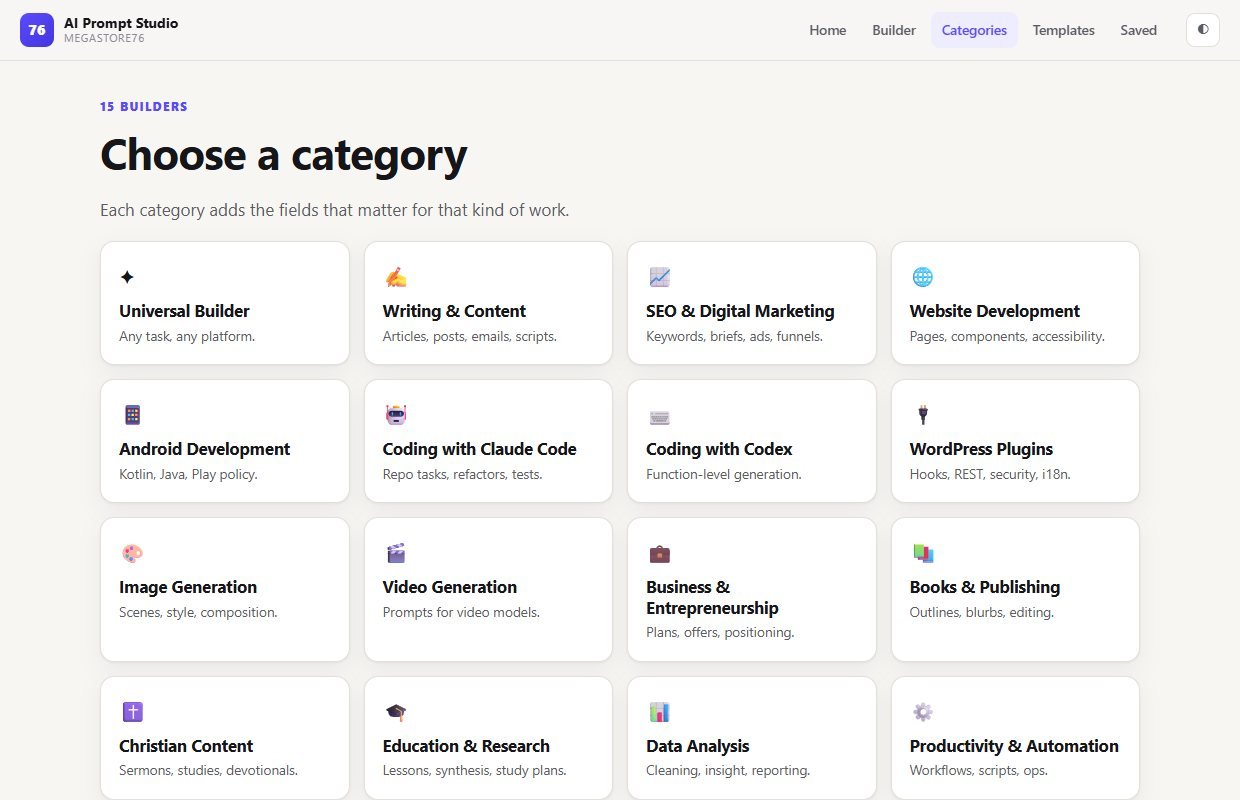
2Pick the kind of work
Each category is a builder with the fields that matter for that work.
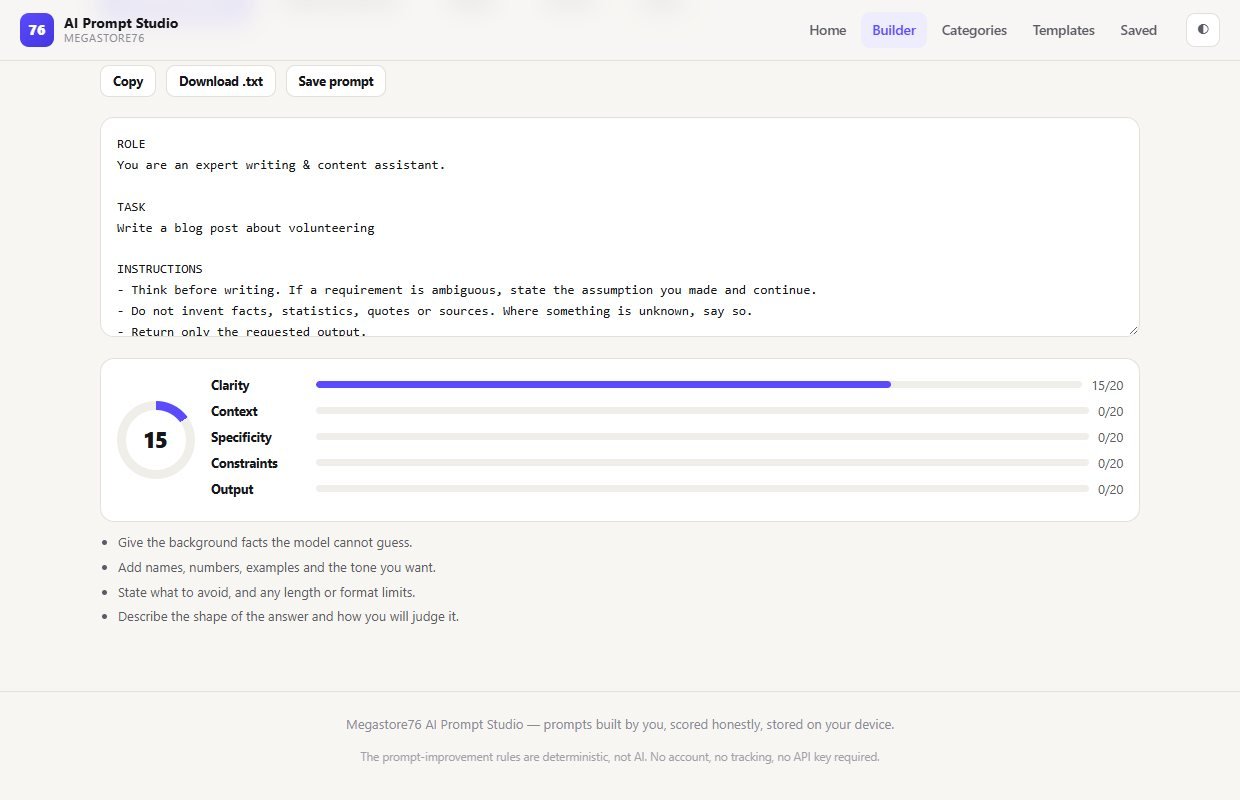
3A one-line task scores low
Here the only thing filled in is the task, "Write a blog post about volunteering". The studio builds a prompt and scores it 15 out of 100, and tells you what is missing: background, names and tone, what to avoid, and the shape of the answer.
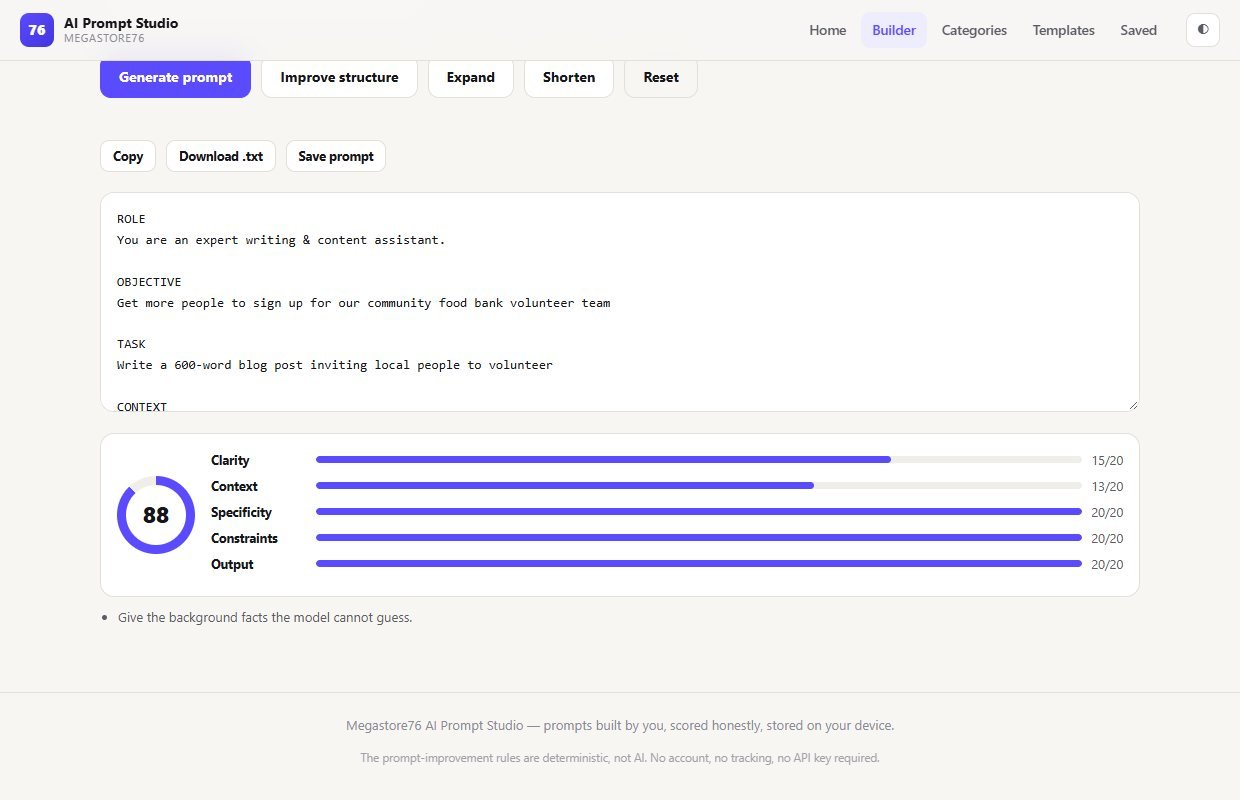
4A complete brief scores high
The same request with an objective, background, audience, platform, tone, format and constraints filled in. The score rises to 88 out of 100, and the one remaining tip is to add more background facts.
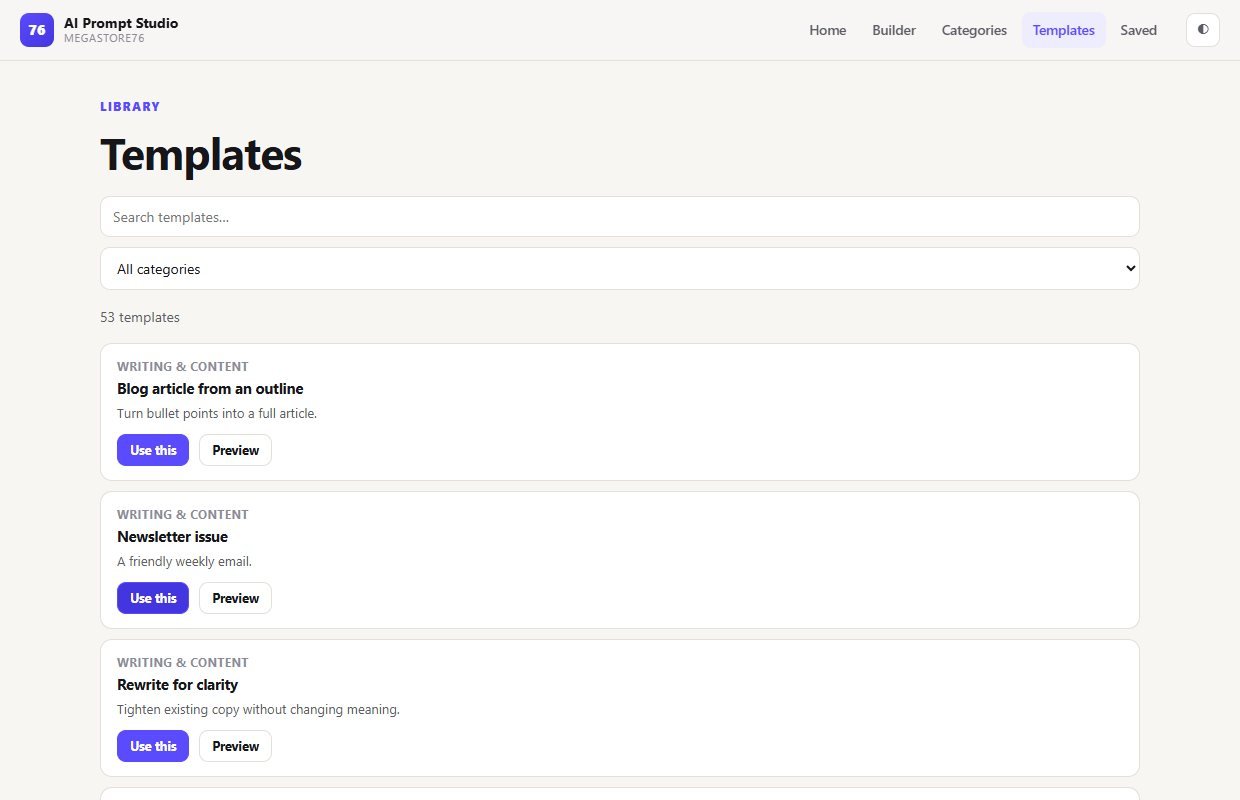
5Start from a template
Search the library or filter by category, preview a prompt and open it in the builder with one click.
6On a phone
The studio on a phone screen.
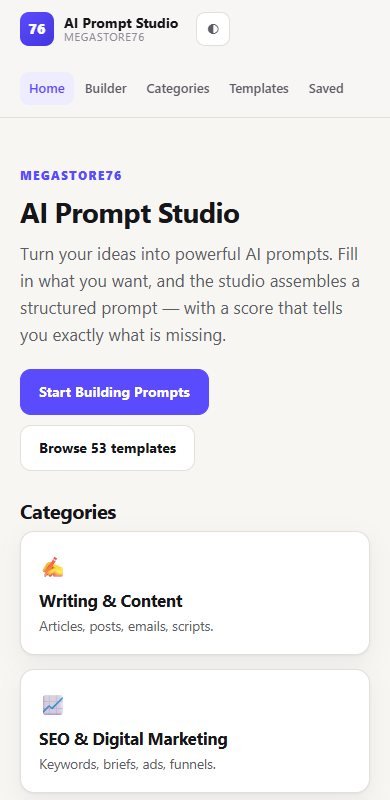
These are unedited screenshots. The scores shown are what the studio gave for the example text we typed in. Your own scores depend on what you write.
Install and set up
The download contains the Android app and the web version of the studio. Use whichever suits you.
What you need
- For Android: a phone or tablet, and permission to install an app from a file
- For the web version: a web host, or Node.js to run it on your own computer
- Nothing else: there is no account, API key, database or build step
To put it on your own website
- Upload everything in the Web-App folder to your host (you can leave out the start and serve files)
- Serve it over https
- It is a static site, so any ordinary web hosting will do
Unzip the download
It contains an Android folder, a Web-App folder and a short guide.
Android
Copy the APK file to your phone, tap it and allow installation from that source, then open AI Prompt Studio. It works with no internet connection.
On your computer
Install Node.js once, open the Web-App folder and double-click the start file. The studio opens in your browser.
On your own website
Upload the contents of the Web-App folder to your host, in the main folder or a subfolder.
If you installed an earlier version of the Android app before, uninstall it first. Uninstalling removes any prompts saved in it.
What you receive after buying
You receive one zip download from Selar, straight after payment.
In the download
- An Android app (APK file) that works with no internet connection
- The web version of the studio, ready to put on your own website or run on your computer
- A short guide with installation steps and the licence
Not included
- A hosted copy to sign in to: there are no accounts
- An AI service: the studio does not call any AI, and you paste the prompt into the AI you use
- Web hosting or a domain name
- A Windows program: on a computer you use the web version
- Updates are not promised. You get the current version
Limits and honest notes
Better you know before you buy. These come from using the studio.
- It does not use AI. It assembles prompts from your fields using fixed rules, and the Improve, Expand and Shorten buttons are rule-based too. You paste the finished prompt into the AI of your choice.
- The score measures how complete the prompt is. It does not predict how good an AI's answer will be, and it cannot judge whether your facts are right.
- Saved prompts stay on one device. There are no accounts and no sync. Clearing the app's data deletes your saved prompts, so copy or download any you want to keep.
- The templates are a fixed set. You can save your own prompts, but there is no way to add your own templates to the library.
- Installing the Android app needs permission to install from a file. It is not installed from an app store.
- The web version needs either a web host or Node.js. It cannot simply be opened by double-clicking its page, because the browser blocks it from loading the template library that way.
- A licence for your own use. You may use it for your own work and your clients' work. You may not resell, redistribute or republish the app as your own.
- English only.
Questions
Can I try it before I buy?
Yes. The same studio is free to use on this website, with no sign-up. The paid package gives you your own copy to install and host.
Which AI tools does it work with?
Any of them. The studio builds the prompt and you paste it into ChatGPT, Claude, Gemini, Copilot, an image generator or whatever you use.
Does the studio use AI itself?
No, and it says so. It assembles your prompt from the fields you fill in, and the Improve, Expand and Shorten buttons follow fixed rules. Nothing you type is sent to any AI service.
What does the score mean?
Each prompt is scored out of 100 across five parts, each out of 20: clarity, context, specificity, constraints and output. It shows how complete the prompt is and tells you what to add.
What kinds of prompts can I build?
There is a universal builder plus builders for writing, SEO and marketing, websites, Android apps, coding with Claude Code or Codex, WordPress plugins, image and video generation, business, books and publishing, Christian content, education and research, data analysis, and productivity.
Are there ready-made templates?
Yes. The template library has ready-made prompts you can search, filter by category, preview and open in the builder.
Are my prompts saved?
Only if you press Save, and then only on your own device. You can also copy a prompt or download it as a text file.
Do I need an API key or an account?
No. There is no API key, no account and no subscription.
Ask better. Get better answers.
One payment: an Android app and the web version of the studio.
Buy AI Prompt Studio · £6.99All our tools are listed on the tools catalogue. Free browser tools are in the tools hub.