Abandoned Cart Recovery: win back shoppers who left without paying
Abandoned Cart Recovery is a WooCommerce plugin that notices when a shopper fills a cart, enters their email at checkout and then leaves without paying. It then sends them up to three emails from your own site: a reminder, a follow-up with a one-time discount coupon made just for them, and a last-chance note. A dashboard shows how many carts were captured and recovered. There is no email service to sign up to and no subscription.
What Abandoned Cart Recovery does
Many shoppers add products to the cart, start the checkout and then get distracted. A gentle email can bring some of them back. This plugin sets that up for your WooCommerce shop without a separate marketing tool.
As soon as a shopper types their email at checkout, the plugin saves the cart and the address in your own database, even if they never press Place order. If they do not complete the purchase, the plugin sends them its emails on the schedule you set, and marks the cart as recovered if they come back and order.
Who it is for
- WooCommerce shops that want to recover lost sales without paying for a separate email service.
- Small stores that want an automatic, one-time discount for returning shoppers.
- Owners who like to keep customer data and sending in their own hands.
Who it is not for
- Sites without WooCommerce: it works on the WooCommerce cart and checkout.
- Anyone who needs designed, branded email templates, SMS or push messages: the emails are simple and are sent by email only.
- Stores with no way to send reliable email from WordPress: the plugin sends through your site's normal email, so that must work.
How it works
Capture, wait, nudge up to three times, and record the result.
It captures the cart
When a shopper with items in their cart enters a valid email at checkout, the plugin saves the email, the items and the total. For logged-in customers it uses their account email.
It waits
A cart counts as abandoned after a number of minutes of inactivity (20 by default). Then the first email goes out after the delay you set (1 hour by default).
It sends up to three emails
A reminder, then a follow-up (24 hours later by default) that includes a one-time coupon created for that shopper, then a last-chance email (72 hours by default). Each shopper gets each email once.
It records what happens
If the shopper reaches the thank-you page, the cart is marked recovered, and the dashboard counts it.
The emails are sent by your own WordPress site using its normal email function, and a scheduled task checks for carts to email about every fifteen minutes.
Features
This is the complete list of what version 1.0.0 does. Nothing here is a roadmap item.
Catches guest checkouts
The email is captured the moment it is typed into the checkout field, so shoppers without an account are covered.
Three-email sequence
A reminder, a discount nudge and a last-chance email, each with a delay you set.
Automatic one-time coupon
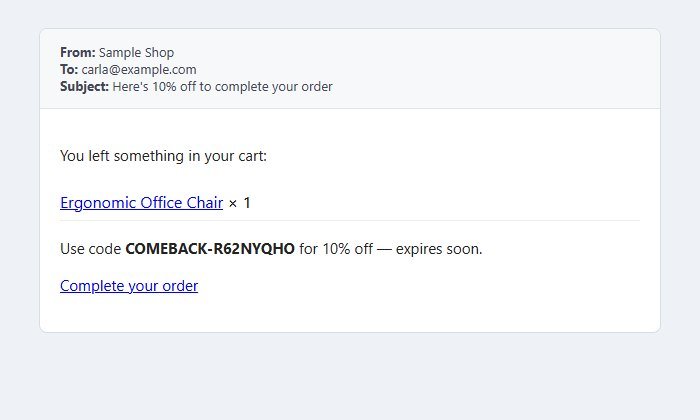
The second email includes a real WooCommerce coupon, made for that email address, single use, with your discount percentage and expiry. The email's button adds it to the checkout link.
Your own wording
Set the three email subjects and the sender name.
Cart contents in the email
Each email lists the items the shopper left, with links to them, and a button back to checkout.
Settings you control
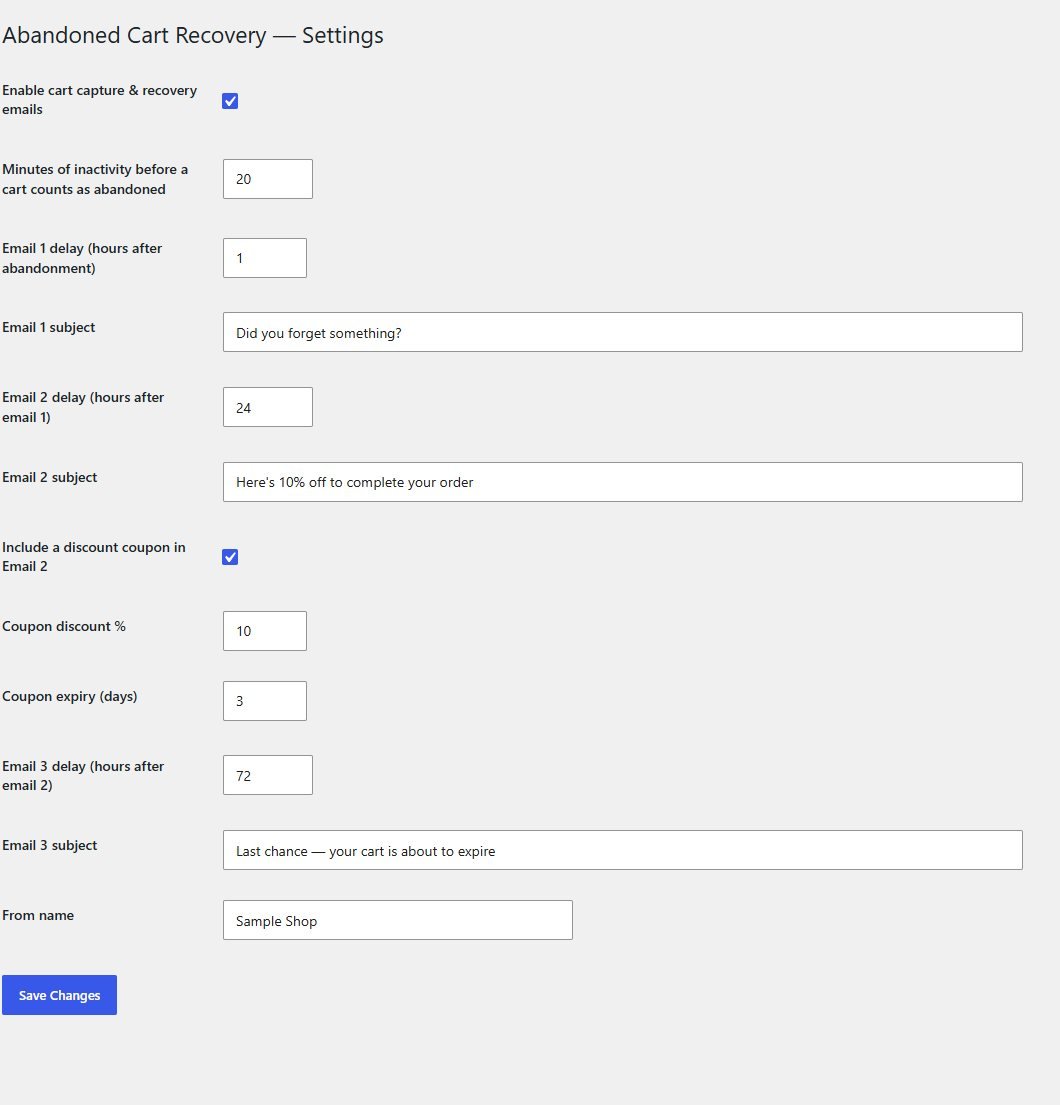
Minutes before a cart counts as abandoned, the delay for each email, whether to include a coupon, the discount percentage and expiry, and the maximum attempts per cart.
Recovery dashboard
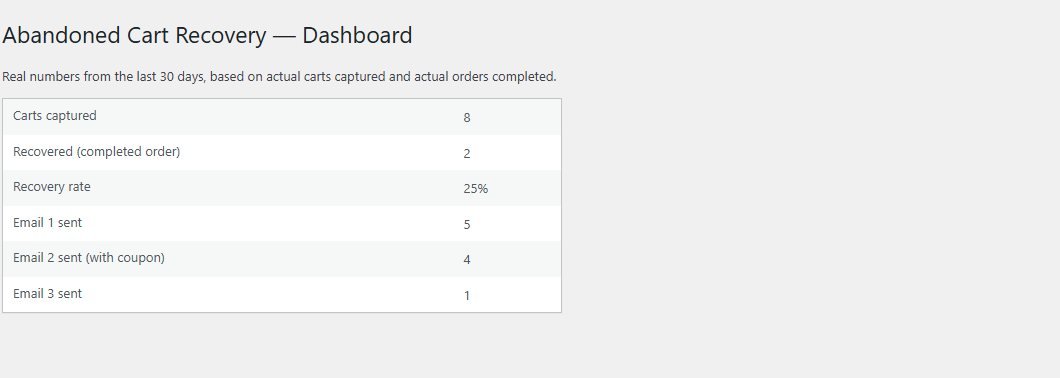
Carts captured, recovered orders, the recovery rate and how many of each email were sent, for the last 30 days.
Sent from your own site
No third-party email service, no API keys and no monthly fee.
Clean uninstall
Deleting the plugin removes its settings and its cart table.
Walkthrough: what it captures, what it sends, how it is doing
These are real screenshots of the plugin running on a test WooCommerce shop. The carts in the dashboard are eight sample carts I added to show the numbers, and the email is the real second email, as the plugin produced it for a sample cart.
1See how recovery is going
The dashboard shows how many carts were captured, how many were recovered by a completed order, the recovery rate and how many of each email have gone out.
2The follow-up email with a coupon
The second email lists the shopper's cart and offers a one-time code. It is a plain email with a link to the checkout that applies the coupon.
3Set the timing and the coupon
In Cart Recovery, Settings choose how long before a cart counts as abandoned, when each email goes, the coupon discount and expiry, and the subjects.
These steps use only features that are in the plugin.
Install and set up
Installing it is the same as any WordPress plugin: upload a zip in the WordPress admin. WooCommerce must already be installed.
What you need
- A self-hosted WordPress site (WordPress.org software), kept up to date
- WooCommerce installed and active
- A working way to send email from your site (many hosts need an SMTP or mail plugin for reliable delivery)
- Permission to install plugins on your site
Running it on a real website
- Send yourself a test: add something to the cart, enter your email at checkout, leave, and wait for the schedule
- Check that email from your site reaches inboxes and not spam
- WordPress runs its scheduled tasks when the site gets visits. On a very quiet site, set up a real server cron for it
- Update the second email's subject if you change the discount percentage: the subject text is yours to edit
- Read your local rules on marketing email and make sure you can honour opt-out requests
Upload and activate
In WordPress go to Plugins, Add New, Upload Plugin, choose the zip, install it and press Activate. A Cart Recovery menu appears.
Choose your settings
Open Cart Recovery, Settings. Set the delays, whether to include a coupon and its percentage and expiry, the subjects and the sender name.
Test it
As a shopper, add a product to the cart and enter your email at checkout, then leave. After the delays you set, the emails arrive.
Watch the dashboard
Open Cart Recovery, Dashboard to see captured and recovered carts.
What you receive after buying
You receive the plugin as a single zip download from Selar, straight after payment.
In the download
- The plugin, ready to upload to WordPress
- A clean uninstall routine
Not included
- WooCommerce itself, hosting or a WordPress site
- An email-sending service: the plugin uses your site's own email
- Installation or setup service
- Updates or new features are not promised. You get the current version, 1.0.0
Limits and honest notes
Better you know now than discover it after you install. These come from the plugin's own code.
- Emails depend on your site's email working. It uses WordPress's normal mail function. If your host's email is unreliable, recovery emails may not arrive. An SMTP plugin usually fixes that.
- The emails are simple. They are short HTML emails with the cart items, a coupon (in the second email) and a link. There is no template designer, logo or per-product styling, and the wording of the email body is fixed. You can change the subjects and sender name.
- There is no unsubscribe link in the emails. Many countries expect an opt-out in marketing email. Add your own process before you use it on real customers.
- It only works if the shopper gives an email. A cart with no email, from a visitor who left before the email field, cannot be emailed.
- Timing depends on WordPress's scheduled tasks, which check about every 15 minutes and run when the site is visited. A very quiet site may need a real cron job.
- The coupon is in the second email only, and its subject line text is your own: the default mentions 10%, so change it if you change the percentage.
- Each shopper gets each email once, up to the maximum attempts you set.
- Recovered means the shopper reached the thank-you page in the same session. An order placed later from another device may not be counted.
- The dashboard shows totals for the last 30 days, not a list of individual carts, and there is no export.
- English wording in the email body out of the box, though every text can be translated.
Questions
Do I need an email service like Mailchimp?
No. The plugin sends the emails itself through your own site. You do need your site to be able to send email reliably.
How does it get a guest's email?
When a shopper types their email in the checkout field and moves on, the plugin saves it with their cart, even if they never place the order.
Is the discount coupon real?
Yes. It is a normal WooCommerce coupon, created for that email address, usable once, with the discount and expiry you set.
Can I turn the coupon off?
Yes. Untick the coupon option and the second email is sent without one.
Will a customer get the same email twice?
No. Each of the three emails is sent once per cart.
Can I change what the emails say?
You can change the three subject lines and the sender name. The body wording is fixed in the plugin, and a developer can change it.
Does it work with page caching?
Capture happens through WooCommerce's checkout and a small script on the checkout page, so it works with normal caching, which should not cache the checkout.
Does it include an unsubscribe link?
No. Add your own way for people to opt out before you use it on real customers.
Bring back the shoppers who almost bought.
One payment, three emails, and a coupon that is made for each shopper.
Buy Abandoned Cart Recovery · £29All our tools are listed on the tools catalogue. Free browser tools are in the tools hub.