Smart Home Setup Without the Headaches: plan it first, so it keeps working
Smart Home Setup Without the Headaches is a short PDF for people who want a smart home that stays reliable. It explains why smart homes frustrate people, gives you four questions to ask before you buy anything, compares the four main ecosystems (Apple Home, Google Home, Amazon Alexa and SmartThings) in a simple table, walks you through a six-step setup process, lists common mistakes, explains local control versus cloud-only devices, and helps you build automations you will actually keep. A worksheet helps you plan and record your devices. It is a read-and-do guide, not a software product.
What this guide is
The promise of a smart home is simple. The reality is often a pile of apps, devices that go offline and automations that stop working after an update. Most of that comes from buying one gadget at a time, from different ecosystems, without a plan.
This guide helps you plan before you buy. It shows you how to choose one ecosystem to match the phones in your household, why locks, lights and security devices should keep working without the internet, how to set things up in a sensible order, and how to keep a simple record of what you have.
Who it is for
- Anyone starting a smart home who wants to avoid expensive mistakes.
- People whose smart devices already feel messy and want to get them in order.
- Households with a mix of phones who need to choose an ecosystem.
Who it is not for
- Anyone looking for product reviews or a shopping list: the guide helps you choose an approach and does not recommend specific devices.
- People who want brand-by-brand, button-by-button setup instructions: the guide gives a general process that applies across ecosystems.
- Advanced home-automation hobbyists: it is written for beginners and everyday households.
How the guide works
Choose an ecosystem, then build up in order.
Ask four questions
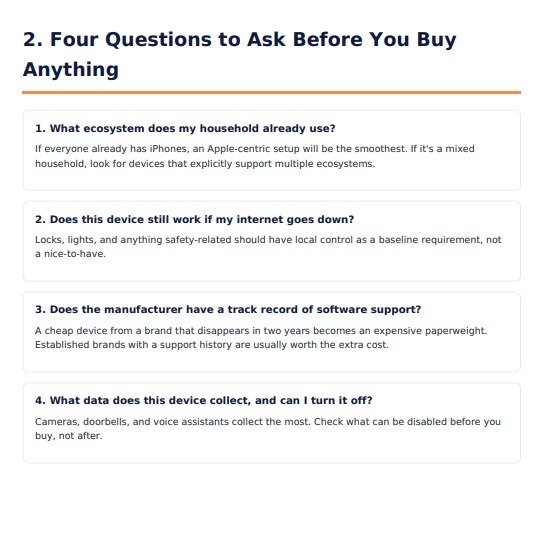
What ecosystem does my household already use? Does the device still work if my internet goes down? Does the manufacturer have a record of software support? What data does it collect, and can I turn that off?
Choose your ecosystem
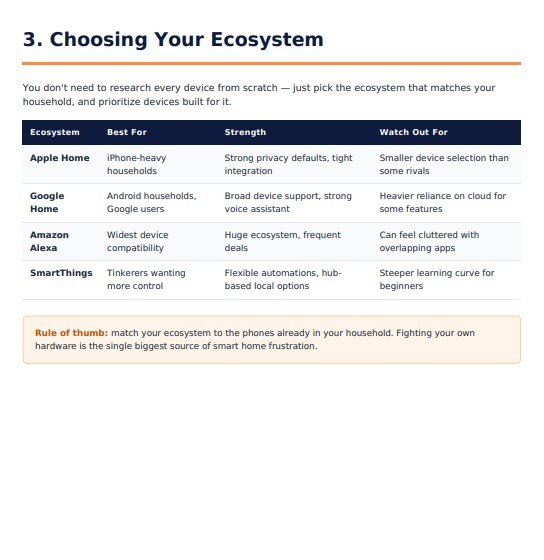
Use the comparison table of Apple Home, Google Home, Amazon Alexa and SmartThings: who each suits best, its strengths and what to watch out for.
Set up in order
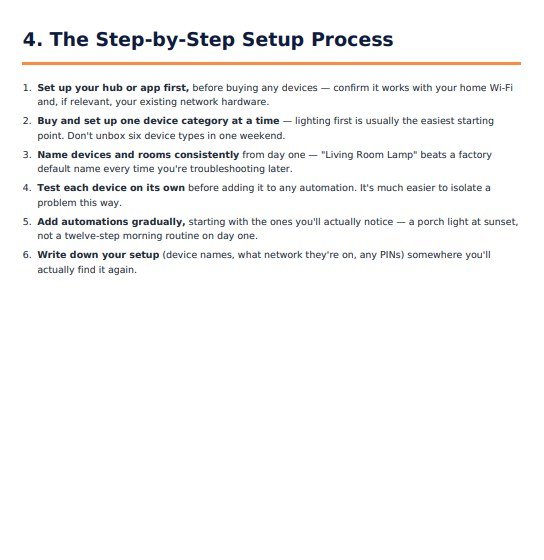
Set up your hub or app first, add one device category at a time, name devices and rooms clearly, test each device on its own, then add simple automations gradually.
Keep a record
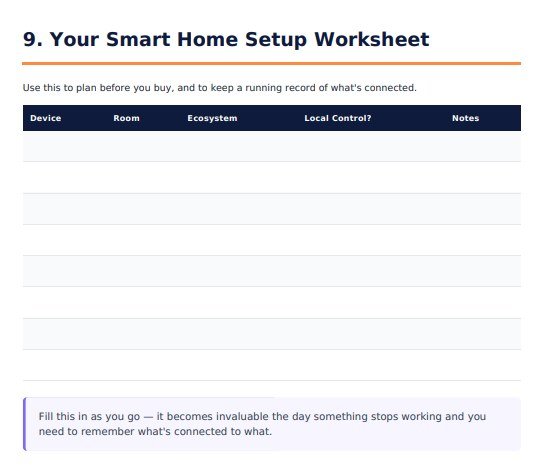
Use the worksheet to note each device, its room, its ecosystem, whether it has local control and any notes.
The guide's rule of thumb: match your ecosystem to the phones already in your household. Fighting your own hardware is the biggest source of smart home frustration.
Features
This is what the guide contains, in the order of its nine sections. Nothing here is a roadmap item.
Why smart homes still frustrate people
A short opening on planning, ecosystems and local control.
Four questions to ask before you buy
Ecosystem, internet-outage behaviour, software support record and data collection.
Choosing your ecosystem
A comparison table for Apple Home, Google Home, Amazon Alexa and SmartThings: best for, strength and watch out for.
A six-step setup process
Hub or app first, one category at a time, consistent names, test each device alone, add automations gradually and write down your setup.
Common setup mistakes to avoid
A checklist covering mixed ecosystems, skipped resets, Wi-Fi bands, over-complex automations, firmware updates and buying security devices on price alone.
Local control versus cloud-only
What each means, and a priority order: door locks and security devices first, then lighting and thermostats, then convenience devices.
Building automations people actually keep
Start with one trigger and one action, add conditions once the basics are solid and review them every few months.
Red flags when buying smart devices
A checklist of warning signs, such as no local control or no published compatibility.
A smart home setup worksheet
A table with columns for device, room, ecosystem, local control and notes. Print it and write on it, or annotate it in a PDF app.
Sample pages from inside the guide
These are real pages from the PDF you receive, so you can see the style and depth before you buy.
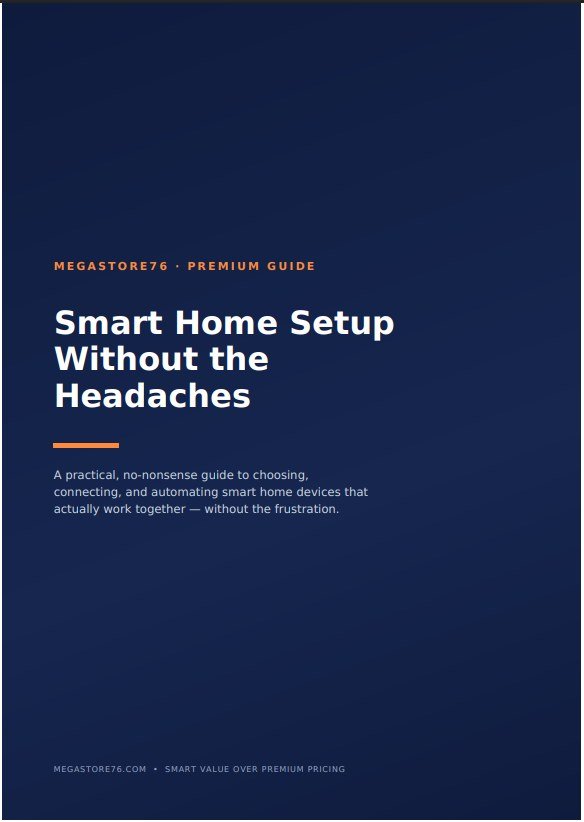
1The cover
The title page of the guide.
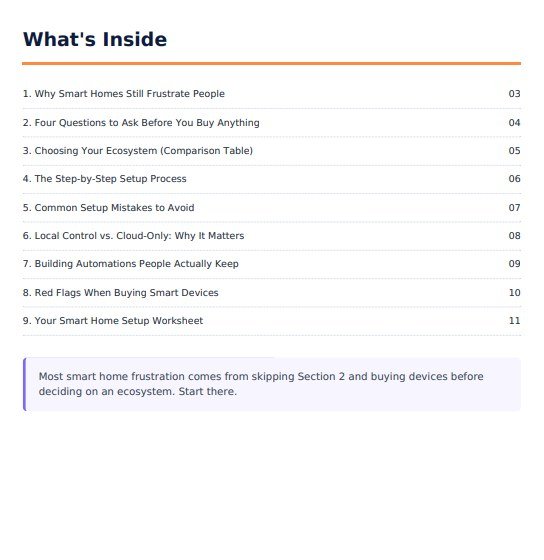
2What is inside
Nine sections, each with its page number.
3Four questions before you buy
Each question comes with a short, plain explanation.
4Choosing your ecosystem
A table comparing the four main ecosystems, with a rule of thumb underneath.
5The setup process
Six numbered steps to follow in order.
6The setup worksheet
A blank table for your devices, rooms, ecosystems, local control and notes.
These are unedited pages from the PDF. The rest of the guide is in the same style.
How to use it
There is nothing to install. You read the PDF before you buy devices, then use the worksheet as you go.
What you need
- Any device or app that opens PDF files
- Knowing which phones your household uses
- A pen and printer, or a PDF app, for the worksheet
To get the most from it
- Read sections 1 to 3 before buying anything
- Fill in the worksheet as you plan and as you add each device
- Keep it somewhere you will find it when something stops working
Download the PDF
After you buy it on Selar, you receive the PDF as a download.
Read before you buy
Work through the four questions and the ecosystem table.
Set up in order
Follow the six-step process and avoid the listed mistakes.
Keep the worksheet
Record each device so you can find it and fix it later.
What you receive after buying
You receive the guide as a PDF download from Selar, straight after payment.
In the download
- The guide as a PDF, ready to read on a phone, tablet or computer
- The smart home setup worksheet, on the last pages of the PDF
Not included
- Smart devices, a hub or any hardware
- Reviews or a shopping list of specific devices
- Brand-specific setup walkthroughs
- Updates are not promised. You get the current edition
Limits and honest notes
Better you know before you buy. These come from reading the guide itself.
- It does not recommend specific devices. It helps you choose an approach and an ecosystem.
- The setup process is general. It applies across ecosystems, so it does not give brand-specific button-by-button steps.
- It is a short guide for beginners. It is not a technical manual.
- Products change. The ecosystem comparison is a general picture. Check the current features and compatibility of any device before you buy it.
- The worksheet is a printed-style table. The PDF has no form fields to type into. Print it, or use a PDF annotation tool.
- No links inside the PDF. References to the Megastore76 website are plain text.
- The guide is for personal use. It says so on its last page.
Questions
Which smart home system should I choose?
The guide's rule of thumb is to match your ecosystem to the phones already in your household, and it compares Apple Home, Google Home, Amazon Alexa and SmartThings to help you decide.
Does it recommend particular devices?
No. It gives you questions and checklists to judge any device.
What is local control?
It means your lights, locks and basic automations keep working during an internet outage. The guide explains it and says which devices to put first.
Is it for complete beginners?
Yes. It uses plain language and a step-by-step approach.
Is the worksheet fillable on screen?
It is a table in the PDF with no form fields. You can print it and write on it, or use a PDF app to add text on top.
Will it help if my smart home already feels messy?
Yes. The mistakes checklist, the local-control section and the worksheet are all useful for sorting out an existing set-up.
What format is it?
A PDF that opens on phones, tablets and computers.
Does it include setup instructions for my specific devices?
No. It gives a general process that applies across ecosystems. Use your device's own instructions for the exact steps.
Plan it once. Enjoy it for years.
A short PDF, four questions and a worksheet to set up your smart home right.
Buy Smart Home Setup Without the Headaches · £6.99All our tools are listed on the tools catalogue. Free browser tools are in the tools hub.