Reading Experience Kit: a progress bar, a contents list and a reading time for long articles
Reading Experience Kit is a WordPress plugin that makes long articles easier to read with three small additions: a thin progress bar that fills as the reader scrolls, a table of contents built from the article's own headings, and an estimated reading time next to the title. It works in any theme, needs no outside service and sets no cookies.
What Reading Experience Kit does
Long articles lose readers when they cannot tell how much is left, or where to find the part they want. This plugin adds the three aids that help: a bar across the window that shows how far through they are, a list of links to each section, and a note of how many minutes the article takes to read.
Each aid is its own switch, and all of them are already on when you activate the plugin. They are added when the page is shown and nothing is written into your posts, so turning the plugin off leaves every article exactly as you wrote it.
Who it is for
- Blogs, magazines and guide sites with long articles.
- Anyone whose theme has no reading aids, or who does not want to lose them when changing theme.
- Site owners who want these features without a tracking script or a subscription.
Who it is not for
- People who want to override the settings on a single post: the settings apply to whole post types.
- Sites that need to measure reading: the progress bar is only a visual aid and nothing is recorded.
- Anyone who needs a contents list that stays the same when a heading is renamed: links are made from the heading text.
How it works
Three small features, each switched on or off separately.
Progress bar
A thin bar, in a colour you choose, fills across the top or bottom of the window as the reader moves through the article.
Table of contents
The plugin finds the headings in the post and makes a list of links that jump to each one. It appears just before the first heading, or only where you place the shortcode.
Reading time
It counts the words in the post and divides by the reading speed you set (200 words a minute by default), then shows, for example, "17 min read" before or after the title, or at the top of the article.
Only where it makes sense
The aids appear only on single posts and pages of the types you choose, never on lists of posts.
A short post gets no contents list at all: you set how many headings are needed (3 by default).
Features
This is the complete list of what version 1.1 does. Nothing here is a roadmap item.
Reading progress bar
At the top or bottom of the window, any colour, 2 to 8 pixels thick. It is just a visual aid, and never sits in front of a click.
Automatic table of contents
Made from the headings already in the post, so nothing is typed twice. The links jump to each section.
Flexible placement
The contents list goes automatically before the first heading, or only where you put the shortcode [megastore76_toc].
Foldable list
The contents box folds with the browser's own control, so it works even with JavaScript off. You can start it folded.
Minimum headings
A post needs at least the number of headings you set (default 3) before it gets a contents list.
Estimated reading time
Shown before the title, after it, or at the top of the article. You set the words per minute and the wording, for example "%d min read".
Separate switches
Turn each of the three aids on or off, and limit the whole kit to the post types you choose.
Works in any theme
It uses standard WordPress filters, so it does not depend on one theme and survives a theme change.
Settings with a live preview
The settings screen shows the real three aids, updating as you change colours, wording and speed.
No tracking
No analytics, no cookies and no outside requests. The only script is a couple of kilobytes of scroll arithmetic.
Clean uninstall option
You can choose to remove the settings when the plugin is deleted.
Walkthrough: what readers see, and where you set it
These are real screenshots of the plugin running on a test WordPress site with a made-up sample article.
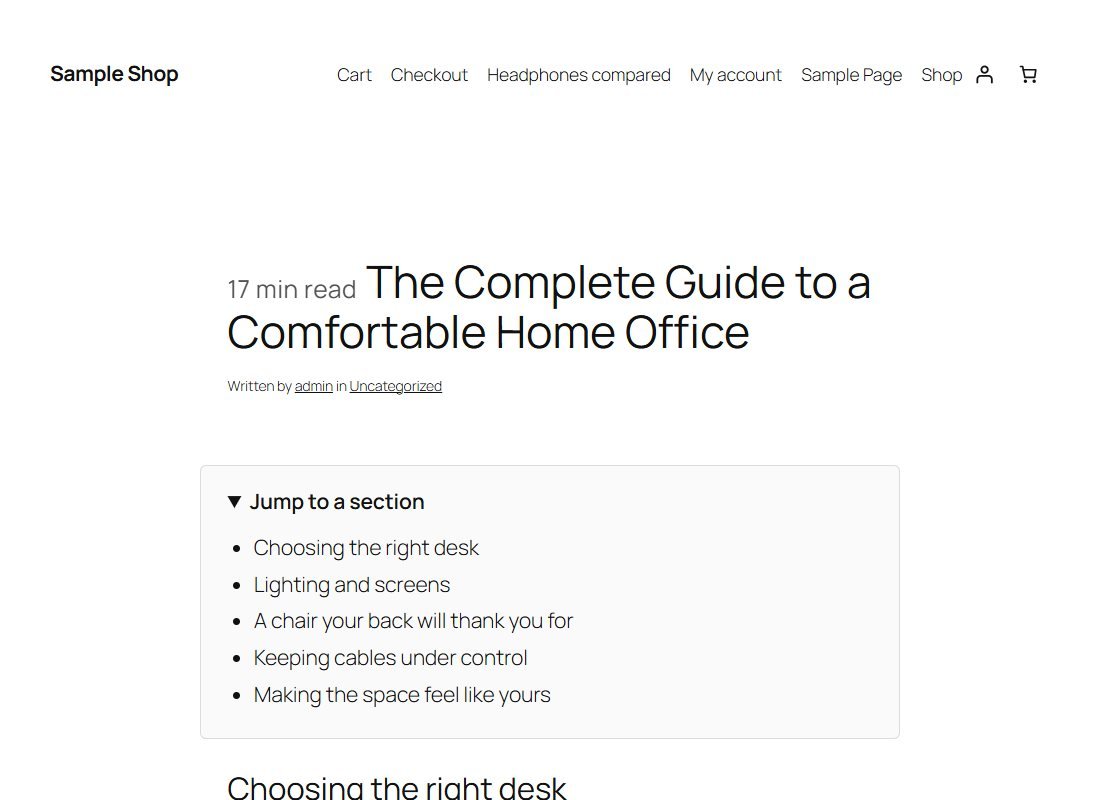
1Reading time and contents
At the top of the article, a "min read" note sits before the title and a foldable "Jump to a section" list shows the headings. Each is a link to that section.
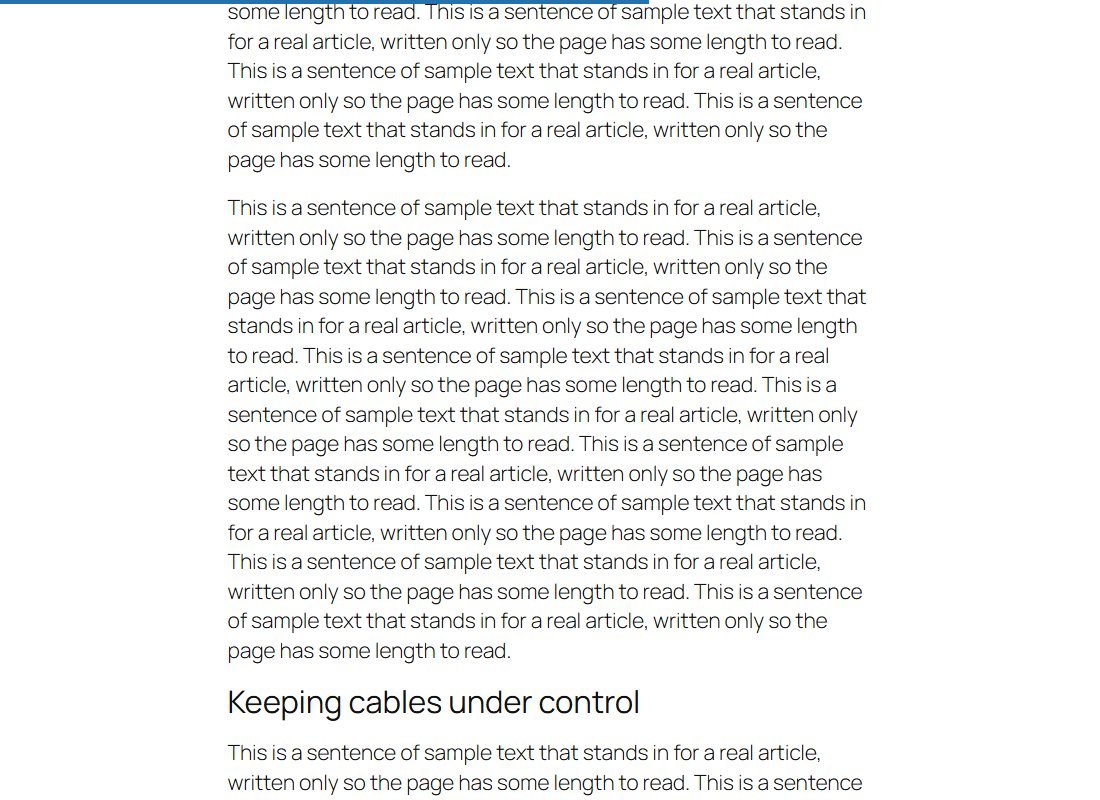
2A progress bar as they scroll
The bar across the top of the window fills as the reader goes down the page. Here the reader is just under half way.
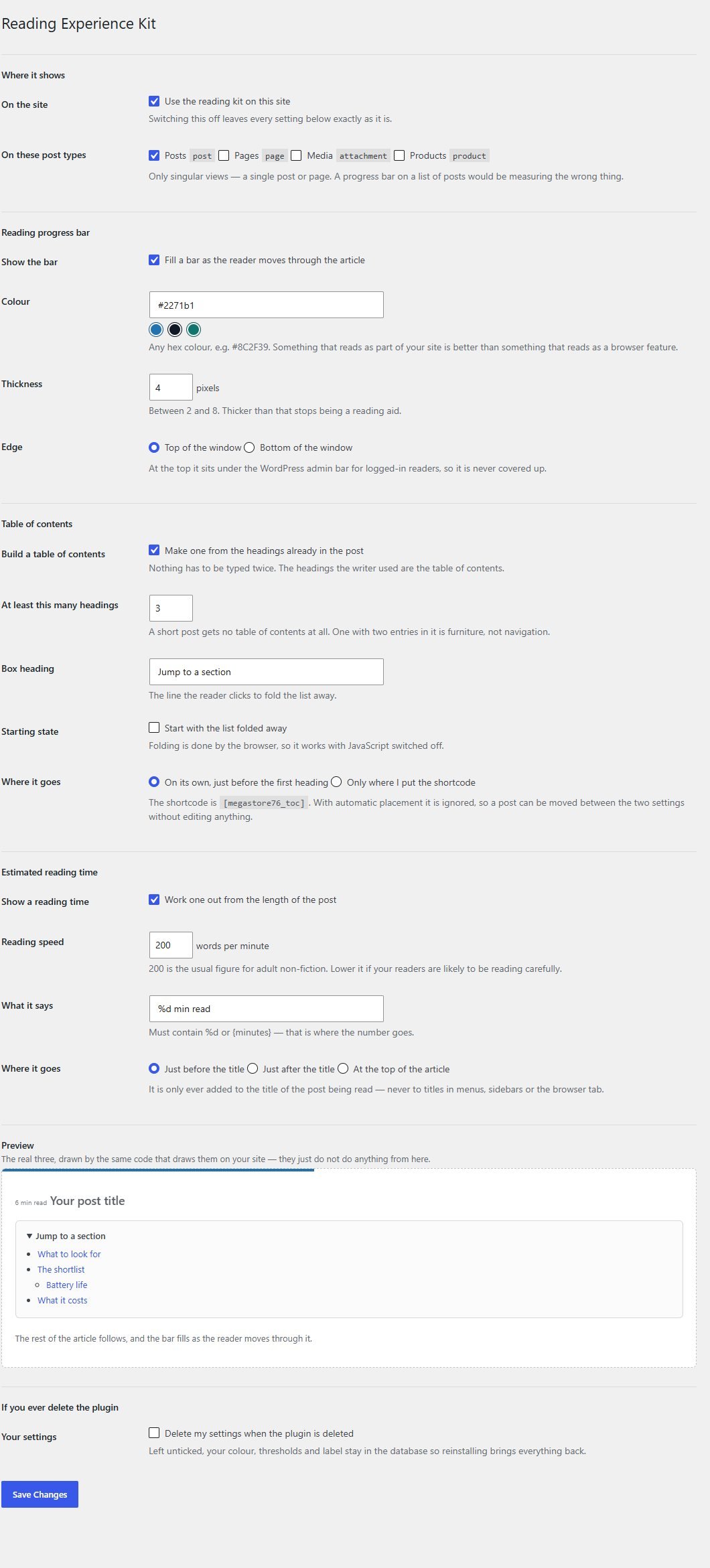
3Set it up in one screen
In Reading Kit in the admin menu you switch each aid on or off and set the colour, thickness, edge, minimum headings, reading speed and wording. The preview at the bottom shows the real thing.
These steps use only features that are in the plugin.
Install and set up
Installing it is the same as any WordPress plugin: upload a zip in the WordPress admin. Everything is on as soon as you activate it.
What you need
- A self-hosted WordPress site (WordPress.org software) running version 6.0 or newer
- PHP 7.4 or newer
- Permission to install plugins on your site
- Articles with headings, for the contents list to have something to list
Running it on a real website
- Check the progress bar on a long post: it measures the article area, found through common theme selectors
- Lower the reading speed if your readers read carefully
- Choose the post types you want, for example posts only
Upload and activate
In WordPress go to Plugins, Add New, Upload Plugin, choose the zip, install it and press Activate. A Reading Kit menu appears.
Open a long post
View a post with at least three headings. The progress bar, contents list and reading time are already working.
Adjust the settings
Open Reading Kit to change the colour, speed, wording and where each piece goes.
What you receive after buying
You receive the plugin as a single zip download from Selar, straight after payment.
In the download
- The plugin, ready to upload to WordPress
- A readme describing the settings and the known limits
- A licence file (the terms are attached separately at the point of sale)
Not included
- Hosting or a WordPress site
- Translations: the plugin is in English, with every text ready to translate
- Installation or setup service
- Updates or new features are not promised
Limits and honest notes
Better you know now than discover it after you install. These come from the plugin's own readme and code.
- Settings are site-wide. You choose post types, not individual posts. There is no per-post override.
- The reading time is an estimate from a word count. Images, tables, code blocks and videos take longer than their words suggest and are not counted.
- Contents links depend on the heading text. They are made when the page is shown, so renaming a heading changes its link and old links go to the top of the page.
- The contents list is built on every page load. It is a cheap single pass, but a post with hundreds of headings on a busy site does that work each time.
- The progress bar measures the article area it can find using common theme selectors. A theme that wraps its article in something unusual falls back to measuring the whole page, which is less exact.
- The progress bar is hidden from screen readers on purpose, because it changes constantly and carries no information a reader needs.
- Single posts and pages only. Nothing appears on lists of posts.
- English only out of the box, though every text can be translated.
Questions
Does it work with my theme?
It uses standard WordPress filters rather than theme files, so it works with most themes. The progress bar looks for the article area using common selectors.
Does it change my posts?
No. Everything is added when the page is shown, so switching the plugin off leaves your posts exactly as written.
Can I turn off one of the three features?
Yes. Each has its own switch in the settings.
Can I place the contents list where I want?
Yes. Choose "only where I put the shortcode" and add [megastore76_toc] where you want it.
Does it track my readers?
No. There are no cookies, no analytics and no outside requests. The progress bar is calculated in the reader's own browser.
Can I change the colour of the bar?
Yes, choose any colour, plus the thickness (2 to 8 pixels) and whether it sits at the top or bottom.
Will it add a contents list to short posts?
Only if they have at least the number of headings you set, 3 by default.
Can I set it differently for one post?
No. Settings apply to the post types you select, not to individual posts.
Help readers finish what they start.
One payment, three reading aids, and nothing sent to anyone.
Buy Reading Experience Kit · £19All our tools are listed on the tools catalogue. Free browser tools are in the tools hub.