Smart glasses have been “the next big thing” for over a decade, and every year brings a fresh wave of hype. But 2026 feels different. For the first time, there’s a real lineup of AI and AR glasses on shelves right now — not concept renders, not Kickstarter promises, but products people are actually wearing to work, on flights, and around the house. So is it finally worth buying in? Or is this still an expensive way to look like you’re auditioning for a sci-fi film?
⚡ Quick Answer: For everyday hands-free use, go with Ray-Ban Meta (Gen 2). For a big virtual screen on a budget, get the RayNeo Air 4 Pro. For the most subtle, glasses-like look, choose Even Realities G2.
We broke down every major category of smart glasses on the market this year, compared the standout models side by side, and answered the question that actually matters: which of these are genuinely useful, and which are still solving a problem nobody has?
Jump to a section
The Smart Glasses Landscape Just Split Into Two Camps
Before comparing individual models, it helps to understand that “smart glasses” now means two very different things, and mixing them up is the easiest way to buy the wrong pair.
AI Glasses (no display): These look like regular eyewear or sunglasses. There’s a camera, a microphone, and speakers, but nothing projected into your eye. You interact entirely through voice, asking your glasses to identify something you’re looking at, take a photo, play music, or answer a question. Ray-Ban Meta is the model that made this category mainstream.
AR/XR Display Glasses: These project an actual screen into the lens, essentially turning the glasses into a private, portable monitor. Some are tethered to a phone or laptop via USB-C, while others handle more of the processing themselves. This is the category built for watching a movie on a flight or extending your laptop screen at a coffee shop.
A smaller number of newer models try to blend both, adding a small in-lens display to an AI-glasses format. That hybrid approach is where things are getting genuinely interesting this year.
Comparison Table: Best AI & AR Smart Glasses of 2026
| Model | Category | Display | Best For | Battery Life | Standout Feature |
|---|---|---|---|---|---|
| Ray-Ban Meta (Gen 2) | AI Glasses | None | Everyday wear, hands-free capture | Extended all-day use with charging case | Most natural-looking, mature camera + AI assistant |
| Meta Ray-Ban Display | AI + Display Hybrid | In-lens monocular display | Glanceable notifications, messages, AI responses | All-day for AI features | Neural Band wrist control via gesture input |
| RayNeo Air 4 Pro | AR Display Glasses | Micro-OLED, HDR | Budget-friendly big-screen streaming and gaming | Tethered (draws from connected device) | HDR support and 120Hz refresh at an entry-level position |
| XREAL 1S / One | AR Display Glasses | Micro-OLED | Frequent flyers, travel entertainment | Tethered | Head-tracking and 2D-to-3D conversion |
| Viture Beast | AR Display Glasses (Premium) | Micro-OLED, high brightness | Best raw image quality and immersive viewing | Tethered | Electrochromic dimming and 3DoF spatial tracking |
| Even Realities G2 | AI + Minimal Display | Lightweight glanceable display | Subtle notifications without the “headset” look | Long battery life due to simple graphics | Nearly indistinguishable from regular glasses |
| Solos AirGo Vision | AI Glasses | None | Live translation, visual recognition | All-day | Swappable front-frame design and conversational AI |
Prices vary by retailer and change frequently, so we’ve focused on what actually matters when choosing a pair: category, use case, and standout features. Check current availability and offers directly on Amazon.
Breaking Down the Best Picks by Use Case
1. Ray-Ban Meta (Gen 2) — Best for Everyday, Hands-Free Use
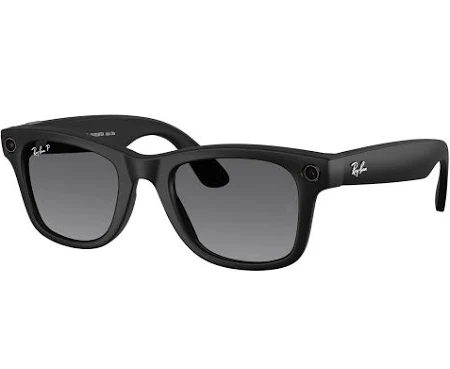
This is still the safest starting point for most people. It looks like a normal pair of sunglasses or eyeglasses, so you’re not signalling “early adopter” to everyone around you. The camera captures decent quality video and photos from a first-person view, and the built-in assistant can answer questions about whatever you’re looking at without needing to touch your phone.
✅ Pros:
- Genuinely comfortable for all-day wear
- Doesn’t look like a tech gadget
- Assistant handles real-world visual questions well
- Long total battery life when paired with the charging case. 🎥 Watch: Ray-Ban | Meta Official YouTube Channel
❌ Cons:
- No display, so no visual notifications or screen mirroring
- Best features rely on a strong connection to a companion app
🛒 Shop on Amazon 🛒 Shop on eBay
2. Meta Ray-Ban Display — Best “Best of Both Worlds” Attempt
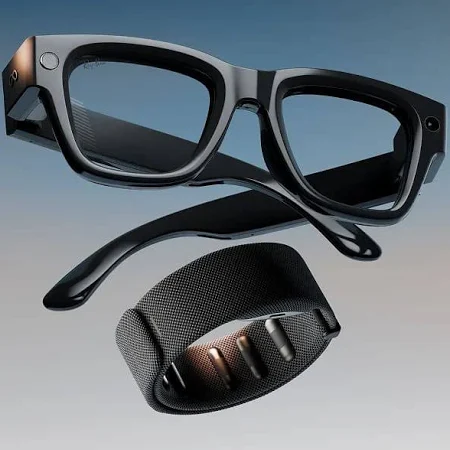
This is the model worth watching if you believe smart glasses eventually need a screen to become truly useful. A small display sits in the right lens, showing messages, directions, and short AI responses, controlled in part by a wrist-worn band that reads muscle signals rather than needing you to tap the frame.
✅ Pros:
- First genuinely credible in-lens display from a major mainstream brand
- Useful for glanceable information without pulling out your phone
- Gesture-based control feels more natural than touch panels. 🎥 Watch: Ray-Ban | Meta Official YouTube Channel
❌ Cons:
- Still early — availability and regional support can be inconsistent
- Priced well above the standard camera-only glass.
🛒 Shop on eBay 🛒 Shop on Amazon
3. RayNeo Air 4 Pro — Best Value AR Display
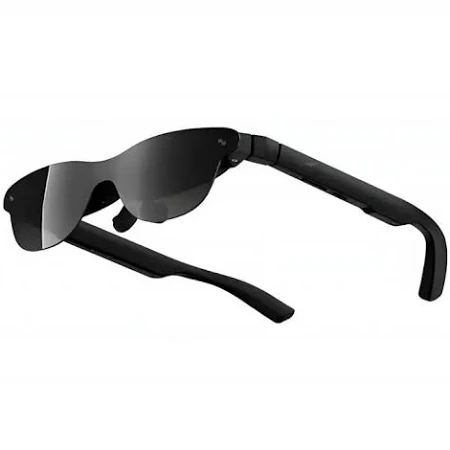
If your main interest is a big virtual screen for movies, gaming, or productivity, this is the pair that keeps showing up at the top of “best value” lists this year. It punches well above its position with HDR support and a sharp, bright display, all in a lightweight frame.
✅ Pros:
- HDR support is rare at this level
- Lightweight, well-balanced frame reduces fatigue
- Strong audio tuning for an immersive feel. 🎥 Watch: RayNeo Air 4 Pro Official TVC
❌ Cons:
- Narrower field of view than pricier competitors
- No electrochromic dimming for bright environments
🛒 Shop on eBay 🛒 Shop on Amazon
4. XREAL 1S / One — Best for Travel
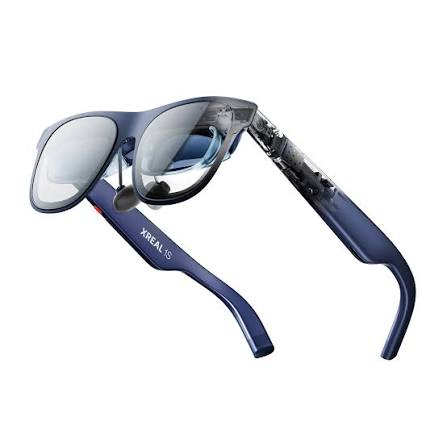
Frequent flyers tend to gravitate here. The head-tracking feature lets the virtual screen stay anchored in space as you move your head, which makes a huge difference in usability during long flights or train journeys.
✅ Pros:
- Excellent head-tracking for a “real screen” feel
- Compact and travel-friendly
- Works with phones, laptops, and handheld consoles. 🎥 Watch: XREAL Official YouTube Channel
❌ Cons:
- Requires a wired connection to your device
- Brightness can struggle in direct sunlight
🛒 Shop on eBay 🛒 Shop on Amazon
5. Viture Beast — Best Raw Image Quality
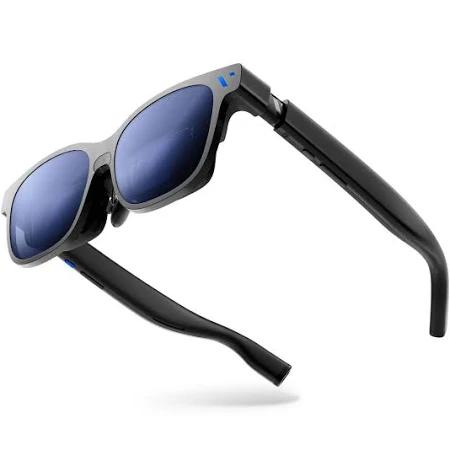
This is the premium pick for anyone who cares more about picture quality than price. The brightness, dimming control, and spatial tracking are all a step above the more affordable options.
✅ Pros:
- Best-in-class brightness and color accuracy
- Adjustable dimming for different lighting conditions
- Strong spatial tracking for immersive use. 🎥 Watch: VITURE Official YouTube Channel
❌ Cons:
- Heavier than some competitors
- Overkill if you only want basic screen mirroring
🛒 Shop on eBay 🛒 Shop on Amazon
6. Even Realities G2 — Best for Subtlety
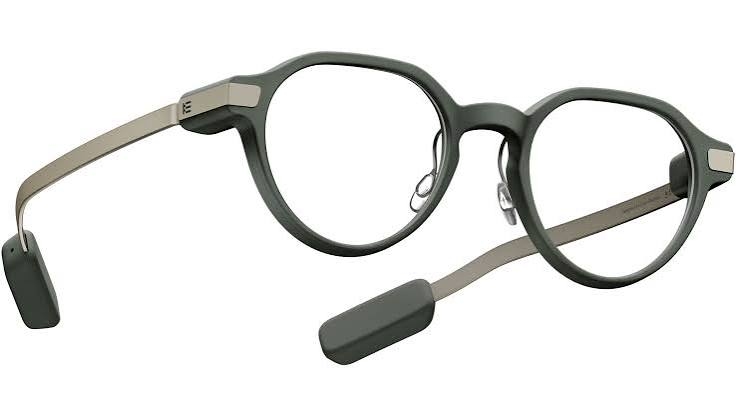
If the idea of wearing an obvious tech gadget on your face puts you off, this is the closest thing to invisible smart glasses currently available. The display is minimal by design, showing just enough information without turning your vision into a dashboard.
✅ Pros:
- Genuinely passes as regular glasses
- Long battery life thanks to simple, low-power graphics
- Ideal for notifications, directions, and quick glances. 🎥 Watch: Even Realities Official YouTube Channel
❌ Cons:
- Not built for entertainment or extended screen use
- Limited compared to full AR displays
7. Solos AirGo Vision — Best for Translation and Visual Recognition
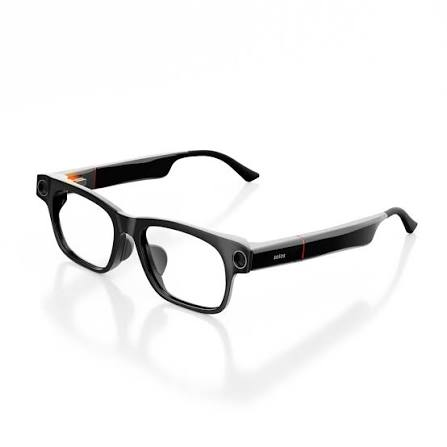
This one leans into conversational AI rather than a display, pairing an on-board camera with an AI model for live translation and object recognition. The swappable frame design is also a nice touch if you want to change the look without buying a second pair.
✅ Pros:
- Strong live translation performance
- Customisable frame styling
- Useful for visual recognition tasks on the go
❌ Cons:
- Open-ear audio quality trails behind some rivals
- No display for visual feedback
So — Hype or Actually Useful?
Here’s the honest verdict: AI glasses are past the hype stage. AR display glasses are getting there fast.
Camera-and-voice AI glasses like Ray-Ban Meta have crossed into genuine daily-use territory for a lot of people. They’re comfortable, socially acceptable, and the assistant features solve real hands-free problems, particularly for capturing moments or getting quick answers without breaking stride.
AR display glasses are more situational. If you travel often, work from different locations, or want a private big screen for gaming and streaming, models like the RayNeo Air 4 Pro or XREAL 1S already deliver a genuinely useful experience today. But if you’re expecting an all-day screen replacement for your laptop or a slick augmented-reality overlay on the world around you, that’s still a year or two away from most consumers.
The hybrid category, glasses that combine a display with AI assistant features, is the one to watch closely for the rest of 2026 and into 2027, as more major brands enter the space.
Frequently Asked Questions
What’s the difference between AI glasses and AR glasses? AI glasses use voice-based interaction with no visual display, relying on a camera, microphone, and speakers. AR (or XR) display glasses project an actual screen into the lens, functioning more like a private, portable monitor.
Are smart glasses worth buying in 2026? For everyday hands-free use, AI glasses are considered ready for daily use by most reviewers this year. AR display glasses are worth it if you have a specific use case, like travel entertainment or gaming, but they’re less essential for casual buyers.
Do smart glasses work with iPhone? Most current AR display glasses connect to iPhone and Android via USB-C, though older iPhone models may need a Lightning adapter. AI glasses generally support both platforms, with some offering a slightly more polished companion app on one system over the other.
Can smart glasses replace your phone or laptop screen? Partially. AR display glasses can effectively mirror a phone, laptop, or gaming handheld to create a large virtual screen, which works well for travel and entertainment. They’re not yet a full replacement for a primary display in daily productivity work.
Are AI glasses good for translation? Some models are specifically built around this feature, using an on-board camera and connected AI model to handle live translation and visual recognition, making them a strong pick for frequent travellers.
What’s the battery life like on smart glasses? AI glasses without a display typically offer several hours of mixed use, extended significantly by a charging case. AR display glasses that are tethered to a phone or laptop draw power from the connected device, so battery life depends less on the glasses themselves.
Do smart glasses come in prescription options? Yes, several current models support prescription lenses either directly from the manufacturer or through clip-in adapters, so this is no longer a barrier for glasses wearers considering a pair.
📥 Get Our Free 2026 Digital Tools Stack
A free guide to the best hosting, VPN, cybersecurity and AI tools for 2026 — delivered straight to your inbox.
Looking for the right pair to start with? Browse the latest AI and AR smart glasses available now: Shop Smart Glasses on Amazon
SEE ALSO Smart Glasses: Discover the Latest Wearable Tech. Previous post
Compare These Picks Side by Side
You Might Also Like
 Amazfit Bip 5 Pro Review 2026: The Best Budget Smartwatch for Everyday Wear
⚡ Quick Answer: The Amazfit Bip 5 Pro is the smartwatch to buy if you want a genuinely…
View Details Best Smartwatches 2026: 8 Picks Compared (£5.67–£113.48)
Eight smartwatches from Megastore76's current stock compared on price, ecosystem and use case — from a £5.67 first watch to a £113 standalone 4G model with its own camera.
View Details Sleep Tracking 2026: Ring vs Watch vs Mattress Sensor vs Smart Alarm Clock
Ring, watch, under-mattress sensor or smart alarm clock — a decision-layer comparison of how each type of sleep tracker actually works, before you pick a specific model.
View Details Amazfit Active 2 Review 2026: Budget Fitness Smartwatch With Real GPS
⚡ Quick Answer: The Amazfit Active 2 punches well above its budget price, packing offline maps, onboard GPS,…
View Details