
Smart displays are more than voice assistants with screens—they’re the modern centerpiece of connected homes. Whether you want to check the weather, control smart lights, make video calls, or follow a recipe while cooking, a smart display adds a visual, interactive layer to your smart home in 2026.
⚡ Quick Answer: For Google households, get the Google Nest Hub Max. For a hands-free kitchen companion, choose the Amazon Echo Show 10. For dedicated smart-home control, go with the Amazon Echo Hub.
Jump to a section
What Is a Smart Display?
A smart display is a voice-controlled device with a touchscreen that pairs assistant capabilities—Alexa or Google Assistant—with visual feedback. You can use it to see calendar events, reminders, and weather at a glance, control smart home devices like lights and thermostats, watch videos or recipes, make video calls, and play music with album art and lyrics on screen.
Comparison at a Glance
| Model | Screen Size | Best For | Standout Feature |
|---|---|---|---|
| Google Nest Hub Max | 10″ | Google ecosystem homes | Built-in camera for video calls and face-match |
| Amazon Echo Show 10 | 10.1″ | Hands-free multitasking | Motorized screen that follows you around the room |
| Amazon Echo Hub | 8″ | Whole-home smart control | Purpose-built wall-mount smart home dashboard |
| Lenovo Smart Display 7 | 7″ | Kitchens & bedside tables | Compact, budget-friendly Google Assistant display |
1. Google Nest Hub Max
A top choice for Google households, the Nest Hub Max pairs a vibrant 10-inch display with solid built-in sound and deep integration with Google services. The built-in camera enables video calls and face-match, showing personalized calendars and reminders to whoever’s standing in front of it, and the visual dashboard makes smart home control genuinely intuitive.
✅ Pros: excellent Google services integration, useful built-in camera for calls and face-match, solid audio for a display of this size.
❌ Cons: camera raises privacy considerations for some households, best features are tied to the Google ecosystem.
Best for: Google Assistant households that want one screen for calendars, calls, and smart home control.
2. Amazon Echo Show 10
The Echo Show 10’s standout trick is its motorized 10.1-inch screen, which rotates to follow you around the room during video calls or while you’re cooking. Alexa is deeply integrated throughout, and the device handles video calling, smart home control, and streaming as a genuine all-in-one hub.
✅ Pros: genuinely useful motion-tracking screen, deep Alexa integration, strong all-round media and smart home features.
❌ Cons: larger footprint than fixed displays, motorized base means more moving parts that can wear over time.
Best for: kitchens and workspaces where you move around while using the display hands-free.
3. Amazon Echo Hub
Unlike Amazon’s Echo Show line, the Echo Hub is purpose-built as a wall-mountable smart home control panel rather than a general-purpose assistant screen. Its 8-inch display shows a customizable dashboard of cameras, locks, thermostats, and routines, designed to be mounted near a front door or in a hallway as a genuine home command center rather than moved between rooms.
✅ Pros: excellent for centralizing smart home control, clean dashboard-style interface, designed for permanent wall mounting.
❌ Cons: less suited to general media/video-call use than the Echo Show, needs Alexa-compatible smart home devices to get full value.
Best for: households with several smart home devices who want one dedicated control panel instead of juggling apps.
4. Lenovo Smart Display 7 with Google Assistant
A compact and affordable option with a 7-inch screen, the Lenovo Smart Display is well suited to kitchens and bedside tables where a full-size display would take up too much room. Google Assistant works reliably for quick video calls, recipe walkthroughs, or controlling connected devices.
✅ Pros: genuinely compact footprint, budget-friendly, reliable Google Assistant performance.
❌ Cons: smaller screen limits video call and media comfort, speaker is noticeably less powerful than larger displays.
Best for: a secondary display for the kitchen counter or bedside table where space is tight.
Verdict: Which Should You Buy?
If you’re deep in the Google ecosystem and want video calling built in, the Nest Hub Max is the easy pick. Amazon households that want a genuinely useful kitchen companion should look at the Echo Show 10 for its motion-tracking screen, while anyone with a growing collection of smart home devices will get more day-to-day value from the dedicated Echo Hub control panel. For a secondary, budget-friendly display, the Lenovo Smart Display 7 covers the basics well.
Frequently Asked Questions
Do smart displays work without a smartphone?
Yes, once set up, a smart display operates independently over Wi-Fi—you only need a phone for the initial setup and occasional app-based configuration.
Can a smart display replace a smart speaker?
Largely, yes—every smart display includes the same voice assistant as its speaker equivalent, plus a screen, so it can do everything a smart speaker does and more, at a somewhat higher price and larger footprint.
Is the built-in camera on a smart display a privacy risk?
Most models, including the Nest Hub Max and Echo Show, include a physical camera shutter or cover, and video is generally processed with visible on-screen indicators when active—check the specific model’s privacy controls if this matters to you.
Browse the latest smart displays on Amazon
📥 Get Our Free 2026 Digital Tools Stack
A free guide to the best hosting, VPN, cybersecurity and AI tools for 2026 — delivered straight to your inbox.
Get My Free Copy →Compare These Picks Side by Side
[megastore76_smartbuy category=”Smart Devices”]You Might Also Like
 <span class="mrx-read-time-wrap mrx-read-time-before"><span class="mrx-read-time-badge">8 min read</span></span> Eufy Review 2026: Are the No-Subscription Cameras and Robovacs Worth It?
Eufy's 2026 lineup reviewed brand-wide — robot vacuums, video doorbells, and security cameras built around local storage with no mandatory subscription, compared against Ring, Arlo, and Wyze.
View Details <span class="mrx-read-time-wrap mrx-read-time-before"><span class="mrx-read-time-badge">10 min read</span></span> Halloween Home Security 2026: Fake Cameras & Motion Lights to Protect Your Porch
Halloween is a genuine higher-risk night for porch theft and burglary. Here's how a decoy camera, a motion-sensor light and a video doorbell cover the real risk — no full security system needed.
View Details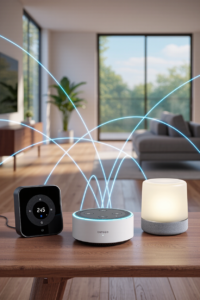 <span class="mrx-read-time-wrap mrx-read-time-before"><span class="mrx-read-time-badge">4 min read</span></span> What Is Matter? The Smart Home Standard Explained (2026)
What the Matter smart home standard actually does, whether you need it, and where it shows up across locks, speakers, displays and lighting.
View Details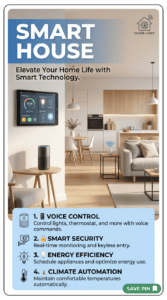 <span class="mrx-read-time-wrap mrx-read-time-before"><span class="mrx-read-time-badge">10 min read</span></span> Smart House: The Ultimate Guide to a Smart Home in 2026
Building a smart house in 2026? We compare the best hubs, lighting, locks, thermostats, and robot vacuums across every major ecosystem so you can build a smart home that actually works together.
View Details

[…] Learn Also Smart Display […]
[…] See Also Smart Display […]