
Fast forward to CES 2026, and Dell did something almost no major tech company ever does — it publicly admitted the mistake. Dell’s leadership stood on stage and apologized to customers, promising to bring back the brand people actually loved. And they delivered. The result is a completely redesigned XPS 14 Laptops and XPS 16, with an even thinner XPS 13 Laptops on the way later this year.
In this guide, we’re breaking down everything you need to know about the new Dell XPS lineup for 2026 — specs, pricing, performance, who each model is really built for, and how it stacks up against the competition. Whether you’re a student, a content creator, or a professional who lives inside a laptop all day, this is your one-stop resource before you spend your money.
⚡ Quick Answer: Yes, Dell XPS is back for good. Most buyers should get the XPS 14 (from $1,599) for portability and all-day battery. Choose the XPS 16 (from $1,749) if you need a bigger screen for content creation. The ultra-thin XPS 13 launches later in 2026.
Jump to a section
Why Dell Brought XPS Laptops Back
Understanding the backstory actually matters here, because it explains a lot about what Dell fixed in this new generation. When Dell rebranded its entire lineup in 2025, the goal was simplification: fewer product names, an easier shopping experience. In practice, it backfired. Loyal customers who had grown up with XPS as shorthand for “premium Windows laptop” felt alienated, and the generic naming made comparison shopping more confusing, not less.
Dell’s PC market share slipped throughout 2025 as a result. By CES 2026, the company reversed course entirely, reinstating XPS as its flagship premium consumer line while keeping the simplified “Dell” and “Dell Pro” names for its budget and business tiers. Alienware remains untouched as the dedicated gaming brand.
The new XPS laptops aren’t just a name swap, either. Dell rebuilt them from the ground up based directly on years of customer feedback, including:
- The return of physical function keys — replacing the capacitive touch row that frustrated users for years
- The XPS logo back on the lid for the first time ever, instead of the plain Dell logo
- A more repairable design with easier-to-remove keyboards and modular USB-C ports
- CNC-machined aluminum and Gorilla Glass construction for a more premium, rigid feel
- Class-leading battery life across both new models
Meet the 2026 XPS Lineup
| Model | Best For | Starting Price | Status |
|---|---|---|---|
| XPS 13 | Ultra-portability, thinnest/lightest XPS ever | Under $2,000 (est.) | Launching later in 2026 |
| XPS 14 | Everyday productivity, portability, all-day battery | From $1,599 | Available now |
| XPS 16 | Larger display, content creation, extra screen real estate | From $1,749 | Available now |
Both the XPS 14 and XPS 16 went on sale in the US in January 2026, with more affordable entry configurations rolling out through February. Dell has also confirmed additional colorways (a new “Shimmer” finish) and an XPS 14 model with Ubuntu 24.04 pre-installed for developers who prefer Linux out of the box.
📺 See more on Dell’s official YouTube channel
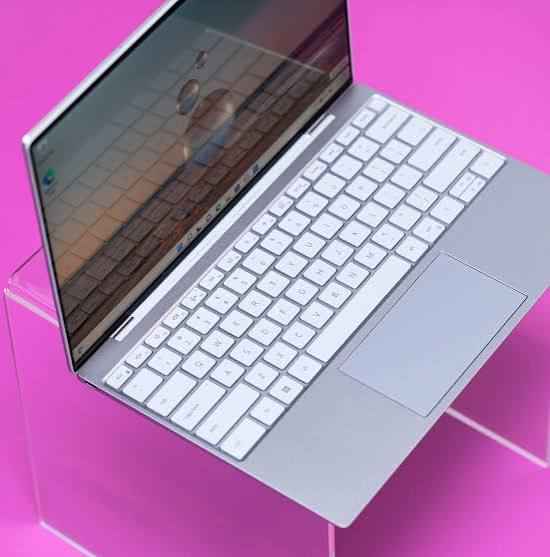
Dell XPS 14 vs. Dell XPS 16: Full Specs Comparison
This is the question most shoppers actually have: 14-inch or 16-inch? Here’s how the two compare at both the entry and top-tier configurations.
| Spec | XPS 14 (Entry) | XPS 14 (Top Spec) | XPS 16 (Entry) | XPS 16 (Top Spec) |
|---|---|---|---|---|
| Processor | Intel Core Ultra 5 325 | Intel Core Ultra X7 358H | Intel Core Ultra 5 325 | Intel Core Ultra X7 358H |
| Graphics | Intel Graphics (integrated) | Intel Arc B390 | Intel Graphics (integrated) | Intel Arc B390 |
| RAM | 16GB LPDDR5X | Up to 64GB LPDDR5X | 16GB LPDDR5X | Up to 64GB LPDDR5X |
| Storage | 512GB SSD | Up to 4TB SSD | 512GB SSD | Up to 4TB SSD |
| Display | 14″ 1920×1200 (2K), non-touch | 14″ 2880×1800 Tandem OLED touch, 120Hz | 16″ 1920×1200 (2K), non-touch | 16″ 3.2K Tandem OLED touch |
| Battery Life (claimed) | Up to 31 hours | Varies by config | Slightly less than XPS 14 (larger panel) | Varies by config |
| Build Material | CNC aluminum, Gorilla Glass Victus | Same | CNC aluminum, Gorilla Glass Victus | Same |
| Ports | 3x Thunderbolt 4, universal audio jack | Same | 3x Thunderbolt 4, universal audio jack | Same |
| Starting Price | $1,599 | ~$3,299 | $1,749 | ~$3,449 |
Our take: if you’re torn between the two, the decision really comes down to screen size and portability rather than raw power — both models share the same processor and memory options. The XPS 16’s extra screen real estate and slightly higher-resolution OLED panel make it the better pick for creative work like video editing or design, while the XPS 14 is the more grab-and-go option for students, writers, and anyone who travels frequently.
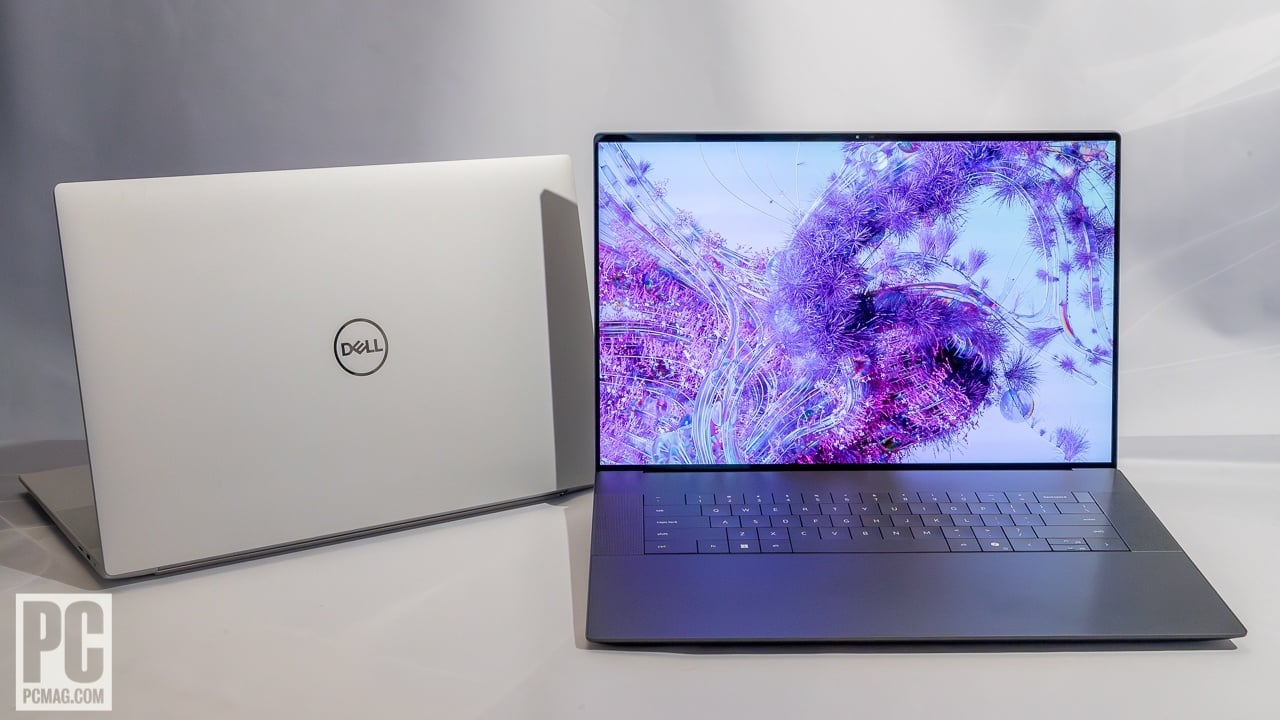
Performance: How Fast Is the New XPS, Really?
The 2026 XPS models are powered by Intel’s new “Panther Lake” Core Ultra Series 3 chips, and early independent benchmarks give us a clear picture of where they land against the competition.
| Laptop | Processor | Geekbench 6 Single-Core | Geekbench 6 Multi-Core |
|---|---|---|---|
| Dell XPS 14 (Ultra X7 358H) | Intel Core Ultra X7 358H | ~2,867 | ~16,927 |
| Dell XPS 14 (Ultra 7 355) | Intel Core Ultra 7 355 | ~2,685 | ~7,964 |
| Asus Zenbook Duo | Intel Core Ultra X9 388H | Higher than XPS 14 | Higher than XPS 14 |
| Apple MacBook Pro (M5) | Apple M5 | ~4,288 | ~17,926 |
In real-world terms, the top-spec XPS 14 comfortably handles video editing, multitasking with dozens of browser tabs, light AI image generation, and even casual gaming thanks to the integrated Intel Arc B390 graphics. It’s not a gaming laptop, but it holds its own better than most ultraportables in its class. The Apple M5 chip in the current MacBook Pro still leads in raw multi-core throughput, which is worth knowing if your work is heavily rendering- or compile-intensive.
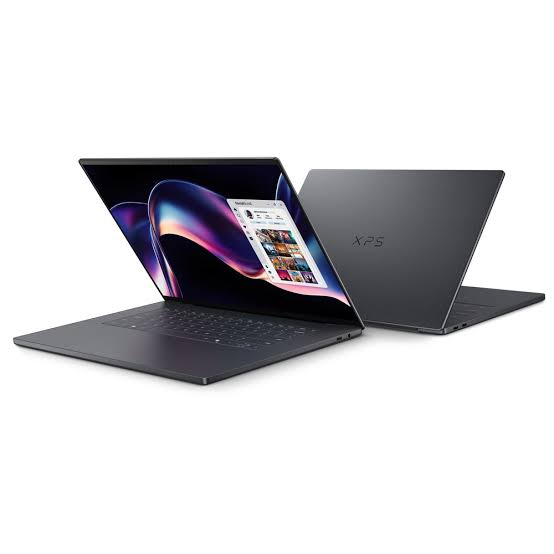
Display Quality: Where the XPS Really Shines
Display quality has always been an XPS calling card, and the 2026 models lean into that hard. The headline feature is the new Tandem OLED panel, offered on both the XPS 14 (2.8K, 2880×1800) and the XPS 16 (3.2K resolution). Reviewers have praised the deep blacks, vibrant color, and the fact that the panel supports a 1–120Hz variable refresh rate for better battery efficiency during static tasks like reading or writing.
There is a genuine trade-off, though: the OLED panel tops out at a fairly modest brightness for a premium 2026 laptop, so if you frequently work outdoors or in bright environments, you may want to stick with the non-touch 2K LCD configuration, which some reviewers actually prefer for daily productivity use.
| Display Option | Resolution | Panel Type | Touch | Best For |
|---|---|---|---|---|
| 2K Standard | 1920×1200 | LCD, 1-120Hz variable refresh | No | Battery life, everyday productivity, bright rooms |
| 2.8K OLED (XPS 14) | 2880×1800 | Tandem OLED, 120Hz | Yes | Content creation, streaming, color-accurate work |
| 3.2K OLED (XPS 16) | Higher resolution than XPS 14 OLED | Tandem OLED | Yes | Video editing, design, larger canvas work |
XPS 14 (2026) vs. XPS 14 (2025): Should You Buy the New One?
If you spot older XPS 14 (2025) stock still on shelves at a discount, it’s worth knowing what you’re trading off. The 2025 model can be configured with a discrete NVIDIA GeForce RTX 4050 GPU, which the 2026 model does not offer — Dell chose to keep the new XPS thin and light rather than include discrete graphics. That makes the older model the better pick for anyone doing serious 3D rendering, CAD, or GPU-accelerated workloads, while the 2026 model wins on portability, display technology, and battery efficiency.
| Factor | XPS 14 (2025) | XPS 14 (2026) |
|---|---|---|
| Discrete GPU option | Yes (RTX 4050) | No |
| Thickness | ~18mm | Thinner |
| Display | Up to 2K | Up to 2.8K Tandem OLED |
| Best for | Rendering, video editing with GPU acceleration | Portability, all-day battery, everyday premium use |
| Ideal Buyer | Creative professionals, engineers | Students, writers, professionals, road warriors |
Dell XPS vs. MacBook Pro: Which Should You Choose in 2026?
This is the comparison everyone in the premium laptop space eventually asks. Here’s a quick breakdown to help you decide between the two ecosystems.
| Category | Dell XPS 14/16 (2026) | MacBook Pro (M5) |
|---|---|---|
| Operating System | Windows 11 | macOS |
| Raw CPU Performance | Strong, slightly behind M5 | Class-leading multi-core scores |
| Display | Tandem OLED, up to 3.2K | Mini-LED / Liquid Retina XDR |
| Repairability | Improved modular design | Limited, proprietary |
| Best For | Windows users, gaming-adjacent work, Linux flexibility | Video/photo editing, Apple ecosystem users |
| Starting Price | $1,599 | Typically higher at comparable specs |
If you’re already invested in the Windows or Microsoft 365 ecosystem, need Linux compatibility, or simply prefer more configuration flexibility, the XPS lineup is a compelling and often more affordable alternative to Apple’s silicon-powered lineup.
Who Should Buy the Dell XPS 14?
- Students who want a lightweight, all-day laptop for note-taking, research, and streaming between classes
- Writers, bloggers, and remote professionals who value portability over raw horsepower
- Anyone upgrading from an older 2023–2024 XPS 13 who wants a modern OLED display
- Buyers who want the “most accessible XPS price point yet”
Who Should Buy the Dell XPS 16?
- Content creators who edit video, photos, or do light 3D work and want extra screen space
- Professionals who use their laptop as a primary workstation rather than a secondary travel device
- Anyone who finds 14-inch displays too cramped for multitasking
Pros and Cons at a Glance
✅ Pros:
- Genuine return of physical function keys and improved repairability
- Stunning Tandem OLED display options
- Excellent battery life across configurations
- CNC aluminum and Gorilla Glass build feels premium
- Competitive starting price compared to rivals
❌ Cons:
- No discrete GPU option, unlike the outgoing 2025 model
- OLED brightness is lower than some competitors at this price point
- Some early buyers have reported keyboard and support issues
- Higher-end configurations climb well past $3,000
Frequently Asked Questions
Is the Dell XPS brand actually back for good? Yes. Dell has confirmed the XPS name is now its permanent flagship premium consumer laptop brand going forward, with an XPS 13 already confirmed for later in 2026 and more devices reportedly planned across different price points and form factors.
What’s the difference between the XPS 14 and XPS 16 apart from screen size? Very little on paper — both share the same processor, memory, and storage options. The XPS 16 does get a higher-resolution OLED panel option and, naturally, more screen real estate, but the internal hardware ceiling is essentially identical.
Does the new XPS come with a discrete graphics card? No. The 2026 XPS 14 and XPS 16 rely on Intel’s integrated Arc B390 graphics rather than a discrete NVIDIA GPU. If you need dedicated graphics power, the outgoing 2025 XPS 14 configuration is still worth considering while stock lasts.
When is the Dell XPS 13 launching? Dell has confirmed the new XPS 13 will launch later in 2026 and is expected to be the thinnest and lightest XPS ever made, along with the most accessible XPS price point to date.
Is the Dell XPS 14 or 16 better for video editing? The XPS 16 is the stronger pick for video editing thanks to its larger, higher-resolution display, which gives you more room to work with timelines and preview footage — though both models share identical processing power.
Final Verdict
The return of Dell XPS in 2026 is one of the more interesting comeback stories in the laptop world this year, and it’s a rare case of a company genuinely listening to customer backlash and course-correcting within a single product cycle. Between the two current models, the XPS 14 is the smarter buy for most everyday users who prioritize portability and battery life, while the XPS 16 earns its place for creators and professionals who need a bigger canvas to work with.
If you’re currently shopping for a new premium Windows laptop, the new XPS lineup deserves a serious look — especially now that more affordable configurations are rolling out and the long-rumored XPS 13 is still to come later this year.
Looking for more in-depth laptop comparisons and buying guides? Check out our other reviews on the best smartphones, cloud storage services, and productivity tools for 2026 right here on MegaStore76.
📥 Get Our Free 2026 Digital Tools Stack
A free guide to the best hosting, VPN, cybersecurity and AI tools for 2026 — delivered straight to your inbox.
ALSO SEE Best Gaming Laptops. The Future of Gaming in High Speed
💻 More Laptop & Computer Guides
You Might Also Like
 Best Student Laptops 2026: Back-to-School Picks Compared (£25–£250)
We compared Megastore76's current laptop stock — real prices, real specs, real condition notes — to find the best back-to-school picks from £25 to £250.
View Details Best Lenovo Laptops 2026: The Ultimate Buying Guide
Lenovo enters 2026 with one of the broadest, most confident laptop lineups on the market — from ultralight…
View Details Best Laptops Under £300: 10 Budget Picks Complete Review
Shopping for laptops under £300 used to mean settling for a sluggish, storage-starved machine that struggled to open…
View Details Best Gaming Laptops. The Future of Gaming in High Speed
Gaming laptops have evolved into some of the most powerful and versatile devices in modern technology. What was…
View Details
[…] ALSO SEE Dell XPS Laptops Are Back: The Complete Buyer’s Guide […]
[…] SEE ALSO Dell XPS Laptops Are Back: The Complete Buyer’s Guide […]
[…] ALSO SEE Dell XPS Laptops Are Back: The Complete Buyer’s Guide […]
[…] ALSO SEE Dell XPS Laptops Are Back: The Complete Buyer’s Guide […]
[…] Dell XPS Laptops: The Complete Buyer’s Guide […]
[…] Dell XPS Laptops: The Complete Buyer’s Guide […]
[…] Dell XPS Laptops: The Complete Buyer’s Guide […]