
Smart speakers have quietly become one of the most useful gadgets you can own — from managing your morning routine to controlling every light in your home with a single voice command. Sitting right at the centre of that revolution is the Amazon Echo Dot (5th Generation), one of the best-selling smart speaker of all time and still, in 2026, one of the smartest ways to step into the Alexa ecosystem.
But with newer models like the Echo Dot Max and Echo Dot with Clock now sharing shelf space, is the 5th Gen smart speaker still worth buying? In this in-depth review, we break down everything you need to know — sound quality, smart home features, Alexa+ capabilities, setup, and how it stacks up against the competition — so you can decide if it deserves a spot on your desk, nightstand, or kitchen counter.
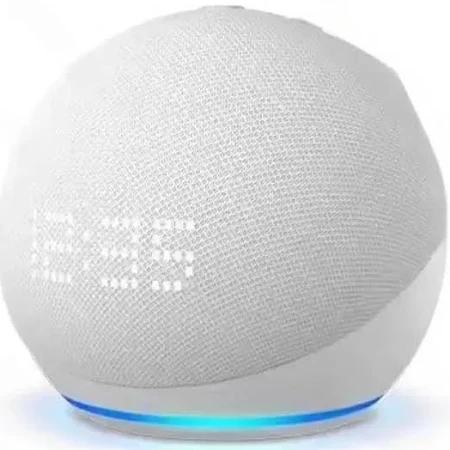
⚡ Quick Answer: Yes, the Echo Dot 5th Gen is still worth buying in 2026 — improved sound, motion + temperature sensors, and Alexa+ make it the easiest budget entry into the Alexa smart home ecosystem. Existing 4th Gen owners don’t need to rush an upgrade.
Jump to a section
What Is the Amazon Echo Dot 5th Generation Smart Speaker?
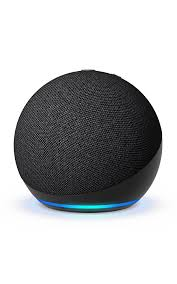
The Echo Dot 5th Gen is Amazon’s compact, spherical smart speaker powered by Alexa. It’s designed for hands-free control of music, smart home devices, daily routines, and information — all wrapped in a soft-fabric, palm-sized design that fits comfortably on almost any surface. It comes in two variants: a standard version and a clock version with a built-in LED display showing time, temperature, or timers.
Since its release, the 5th Gen has become the go-to entry point for anyone building a smart home on a budget, thanks to a genuinely improved feature set over the 4th generation, including onboard sensors that previous Dots simply didn’t have.
📺 Official: Introducing the next generation of Echo devices
Key Features at a Glance
1. Noticeably Better Sound
The 5th Gen features a 1.73-inch front-firing speaker that delivers clearer vocals and deeper bass than any previous Dot. Amazon claims this is the best-sounding Echo Dot yet, with clearer vocals, deeper bass, and vibrant sound, and the 1.73-inch front-firing speaker delivers a dynamic audio experience ideal for music, podcasts, and audiobooks. If you want fuller sound, you can pair two Echo Dots together for true stereo playback, or link it to other Echo devices for multi-room audio.
2. Motion Detection and Temperature Sensor
This is the standout upgrade over the 4th Gen. Motion detection lets Alexa turn on lights or start music automatically when you enter a room, while the built-in temperature sensor allows you to automate devices like fans or air conditioning based on room temperature. These sensors open the door to genuinely useful automation — routines the previous generation simply couldn’t handle.
3. Tap Gesture Controls
A built-in accelerometer enables tap controls on top of the device, so you can pause music, snooze an alarm, or end a timer with a simple tap instead of a voice command — handy for early mornings when talking feels like too much effort.
4. Alexa+ Integration
The newest software layer, Alexa+, brings a more natural, conversational experience to the Echo Dot. It allows users to flow freely between topics without repeating the wake word every time, understanding context and remembering earlier parts of the conversation, and can handle more complex tasks like meal planning and reservations across thousands of compatible brands and services. For Amazon Prime members, Alexa+ is included at no extra cost.
5. Built-In Eero Wi-Fi Extender
In supported regions, the 5th Gen doubles as a mesh Wi-Fi extender when paired with an Eero router, adding up to 1,000 square feet of coverage and handling speeds up to 100 Mbps — enough to stream 4K or HD content on a connected Fire TV.
6. Compact, Upgraded Design
The design keeps the familiar round shape and understated aesthetic of the 4th Gen, available in a choice of colours, with a light-up ring and a small set of top-mounted buttons for volume, mic-off, and Alexa actions. Build quality feels solid for the price, and a non-slip rubber base keeps it firmly in place.
7. Privacy Controls
A physical mic-off button on top disables the microphone entirely, and voice recordings can be reviewed or deleted at any time through the Alexa app.
Echo Dot 5th Gen: Pros and Cons
| ✅ Pros | ❌ Cons |
|---|---|
| Noticeably improved sound over 4th Gen | No 3.5mm audio jack for wired speakers |
| Motion and temperature sensors enable smart automation | Sound still can’t match larger, audiophile-grade speakers |
| Alexa+ brings natural, conversational AI | Wi-Fi extender feature limited to Eero networks and select regions |
| Tap gesture controls for quick actions | Not a dramatic leap if you already own the 4th Gen |
| Compact, stylish design that fits anywhere | Temperature sensor accuracy can be inconsistent indoors |
| Strong privacy controls (mic-off button, voice history management) | — |
Echo Dot 5th Gen vs. Google Nest Mini vs. Apple HomePod Mini
If you’re deciding between ecosystems, here’s how the Echo Dot 5th Gen stacks up against its closest budget rivals.
| Feature | Echo Dot (5th Gen) | Google Nest Mini | Apple HomePod Mini |
|---|---|---|---|
| Voice Assistant | Alexa / Alexa+ | Google Assistant | Siri |
| Motion Sensor | Yes | No | No |
| Temperature Sensor | Yes | No | No |
| Wi-Fi Extender Support | Yes (Eero networks) | No | No |
| Multi-Room Audio | Yes (Echo devices) | Yes (Nest/Google Home) | Yes (Apple devices) |
| Smart Home Hub Compatibility | Extensive (Zigbee, Matter, third-party) | Good (Matter, Google Home) | Best within Apple ecosystem |
| Tap Gesture Controls | Yes | No | No |
| Ideal For | Smart home automation on a budget | Google ecosystem users | Apple/iOS households |
Should You Upgrade From the 4th Gen?
If you already own the Echo Dot 4th Gen, the decision comes down to a few specific factors. The temperature sensor is the most practical new feature, letting you build routines like turning on a fan once the room reaches a set temperature — something the 4th Gen simply cannot do. The built-in Eero extender can also quietly improve Wi-Fi coverage in homes with dead zones. However, if your 4th Gen already sounds fine to you, the sound quality improvement alone likely isn’t dramatic enough to justify an upgrade.
For new buyers, or anyone adding a smart speaker to a new room, the 5th Gen remains an easy recommendation.
How to Set Up the Echo Dot 5th Gen
Setup takes just a few minutes, even if you’ve never used a smart speaker before:
- Plug in the device using the included power adapter.
- Download the Alexa app on your smartphone or tablet.
- Connect to Wi-Fi by following the in-app instructions — the app will guide you through pairing the Dot with your network.
- Start talking to Alexa. Ask it to play music, set a timer, check the weather, or control any compatible smart home devices.
- Set up routines in the Alexa app to take advantage of the motion and temperature sensors — for example, automatically dimming lights in the evening or turning on a fan when the room heats up.
Who Should Buy the Echo Dot 5th Gen?
- First-time smart home buyers who want an affordable, reliable entry point into voice-controlled automation.
- Anyone expanding an existing Echo setup into a new room, bedroom, or office.
- Households wanting hands-free convenience — reminders, timers, weather, news, and shopping lists, all voice-activated.
- Renters and small-space dwellers who need a compact speaker that doesn’t take up desk or shelf space.
It may not be the right choice for audiophiles seeking premium sound, or existing 4th Gen owners without a strong reason to upgrade.
Final Verdict
The Amazon Echo Dot 5th Generation remains one of the smartest, most practical ways to bring voice control and home automation into your daily life without a big investment. Improved sound, genuinely useful motion and temperature sensors, tap gesture controls, and the arrival of Alexa+ all combine to keep this little speaker relevant well into 2026. It’s not a dramatic reinvention of the Dot formula — but it doesn’t need to be. For most buyers, it’s simply the easiest, most sensible way into the Alexa smart home ecosystem.
Frequently Asked Questions
Is the Echo Dot 5th Gen worth buying in 2026? Yes. It remains one of the best budget smart speakers available, offering improved sound, smart home sensors, and Alexa+ integration at an accessible price point.
What’s the difference between the Echo Dot 5th Gen and 4th Gen? The 5th Gen adds a motion sensor, a temperature sensor, tap gesture controls, improved sound quality, and — in supported regions — built-in Eero Wi-Fi extender functionality.
Does the Echo Dot 5th Gen have a headphone jack? No. The 5th Gen does not include a 3.5mm audio jack. You’ll need Bluetooth or a USB-C adapter to connect external wired speakers.
Can I use two Echo Dots together for stereo sound? Yes. Two Echo Dot 5th Gen units can be paired together in the Alexa app to create a stereo sound system.
Does the Echo Dot 5th Gen work with other smart home brands? Yes. It’s compatible with a wide range of third-party smart plugs, bulbs, thermostats, and other devices, in addition to Amazon’s own smart home lineup.
Is Alexa+ free with the Echo Dot 5th Gen? Alexa+ is included at no extra cost for Amazon Prime members. Non-Prime users can access it as a separate subscription.
How is the Echo Dot 5th Gen different from the Echo Dot with Clock? Both share the same internal hardware and features. The Clock version adds a small LED display showing time, temperature, or timers — ideal for a nightstand.
Looking for more smart home essentials? Check out our guide to Smart Devices for a Connected Home and our full Smart Speaker Buying Guide for more tips on choosing the right device for your space.
📥 Get Our Free 2026 Digital Tools Stack
A free guide to the best hosting, VPN, cybersecurity and AI tools for 2026 — delivered straight to your inbox.
ALSO SEE Dell XPS Laptops Are Back: The Complete Buyer’s Guide
You Might Also Like
 Best ANC Wireless Earbuds Under £50 in 2026: 5 Real Noise-Cancelling Picks
Five wireless earbuds under £50 where active noise cancellation is the headline feature, not an afterthought — compared on ANC rating, codec support, and battery life.
View Details Hollyland Review 2026: Are These Wireless Mics, Video Transmitters & Intercoms Worth It for Creators?
Hollyland's LARK wireless mics, Pyro/Mars video transmitters, and Solidcom intercoms reviewed honestly — what each product line does, a strong 4.4/5 Trustpilot record, and how it compares to DJI and Rode.
View Details Best Bose Speakers 2026: SoundLink Micro, Flex, Max & Revolve+ II Compared
Looking for the best Bose Bluetooth speaker in 2026? We compare the SoundLink Micro, Flex, Max, and Revolve+ II side by side — battery life, waterproofing, and sound — so you can pick the right one for how and where you listen.
View Details Best Wireless Headsets Under £50 in 2026: 6 Trending Picks Compared
Six real, currently-trending wireless (Bluetooth) headsets under £50, live-checked on Amazon UK and eBay — covering everyday listening, gaming, remote work calls, and hands-free driving, with a full comparison table and honest pros and cons.
View Details


[…] ALSO SEE Amazon Echo Dot 5th Generation (Review): Amazing Smart Speaker […]
[…] The Echo Dot remains one of the most consistently purchased smart devices on Amazon UK, and the 5th generation model is still the easiest way to bring Alexa into any room without a big outlay. It’s compact, sounds noticeably fuller than older Dots, and works as the hub for lights, plugs, and routines. For the full breakdown, see our Echo Dot 5th Gen review. […]