Free online equalizer: 10 bands, live spectrum, your own music
Load songs from your computer or phone and shape the sound with a real 10-band equaliser. Watch the live spectrum move as you drag, pick a preset for bass, vocals, rock or jazz, and save your own. Free, no sign-up, and nothing is uploaded: your files stay on your device.
- 10 adjustable bands
- Live spectrum analyser
- Private: nothing is uploaded
Open the equalizer
Choose your songs, then drag the sliders while the music plays.
Open the equalizerBest in Chrome, Edge or Firefox on a computer or phone. Installable as an app. Works offline once opened.
Like free tools that just work?
This equaliser is one of several free Megastore76 tools. The pro catalogue has WordPress plugins, apps and guides: pay once, own forever.
How to use the Online Equalizer
- Click Open the equalizer, then open the Library tab and choose some songs or a folder, or drag audio files onto the page.
- Tap a song to play it. The spectrum shows the sound as it comes out of the equaliser.
- Open the Equaliser tab and drag the sliders: left for deep bass, right for sparkle. Tap a frequency label to fine-tune that band.
- Pick a preset from the list for a quick start, or use Save to keep your own, for example one for your headphones and one for your speakers.
- Switch the equaliser off with the power button to hear the original sound and compare.
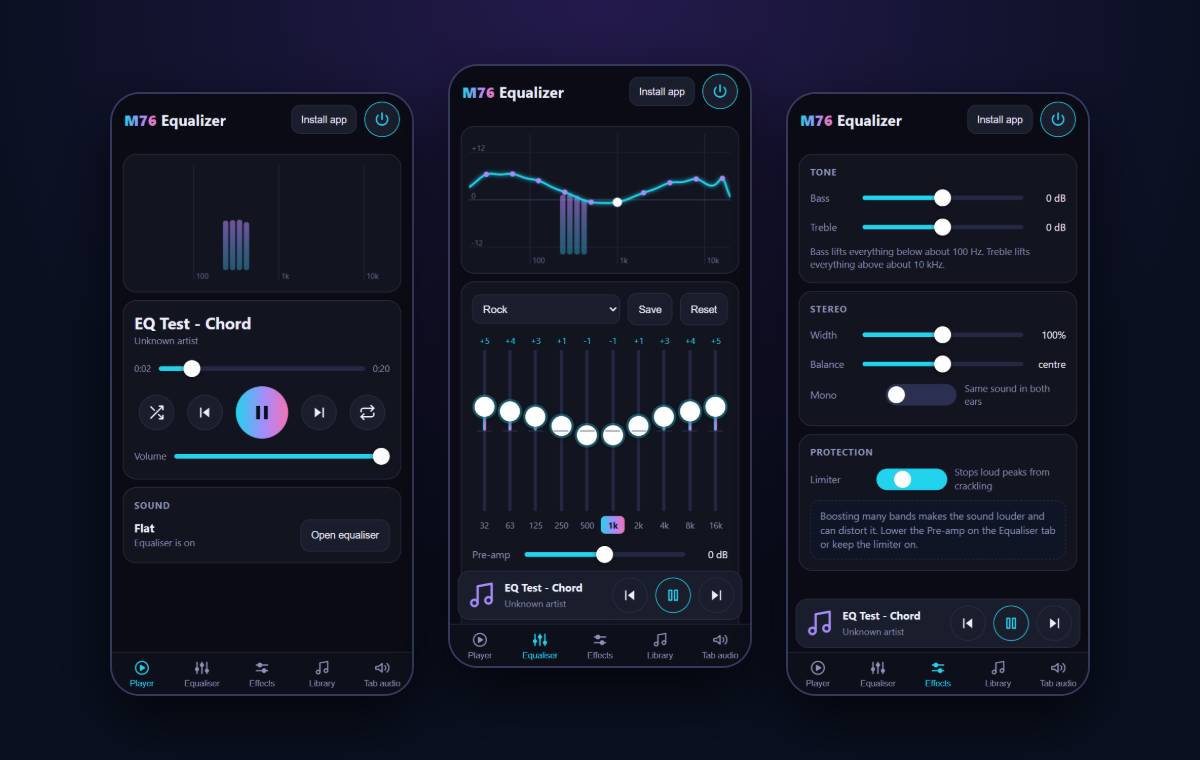
What an equaliser does
An equaliser lets you turn parts of the sound up or down. Low bands (about 30 to 250 Hz) control the bass and the weight of drums. Middle bands (250 Hz to 4 kHz) hold voices and most instruments, so lifting them makes vocals clearer and lowering them can calm a harsh sound. High bands (4 to 16 kHz) add air, detail and sparkle.
Getting a better sound
Small changes usually sound best. Try moving a band by 2 to 4 dB rather than pushing it to the end. If the music sounds muddy, lower the 250 Hz band a little. If voices sound thin, lift 1 to 3 kHz. If everything sounds dull, lift the top two bands. When you raise several bands, lower the pre-amp so the sound stays clean.
Equalise another tab on a computer
In Chrome or Edge, the Tab audio page can listen to a browser tab you choose to share, then play it back through your equaliser. Tick “Share tab audio” when you pick the tab. The tab is muted and its sound returns through the equaliser. Nothing is recorded or uploaded.
Frequently asked questions
Is this online equalizer really free?
Yes. There is no sign-up, no ads and no limit. It runs in your web browser and you can use it as often as you like.
Are my songs uploaded anywhere?
No. The songs you choose are read inside your browser and played from your own device. Nothing is sent to our servers or anyone else’s. Your equaliser settings and presets are saved in your browser only.
What file types can I play?
MP3, AAC and M4A, FLAC, OGG, Opus and WAV, as far as your browser can play them. Chrome and Edge play all of these. Other browsers may not play every format.
How many bands does it have, and can I change them?
Ten bands from 32 Hz to 16 kHz. Each band has its own gain (plus or minus 15 dB), frequency (20 Hz to 20 kHz), width (Q) and filter type: bell, low shelf, high shelf, low cut, high cut or notch. There is also a pre-amp, bass and treble, stereo width, balance, a mono switch and a limiter.
Can I equalise Spotify, YouTube or every sound on my computer?
A web page cannot change the sound of other programs, so this equaliser plays your own files and, in Chrome or Edge, a browser tab you share. For all sound on a Windows PC, install the free Equalizer APO, then use the Download for Equalizer APO button in the Tab audio page: it saves your curve as a file Equalizer APO understands.
Why does the sound get louder or crackle when I boost the bands?
Raising several bands adds up to a louder signal that can distort. Lower the pre-amp by a few dB, or keep the limiter switched on. It catches loud peaks before they crackle.
Which presets are included?
Seventeen: Flat, Bass Boost, Bass Reducer, Treble Boost, Vocal Boost, Rock, Pop, Jazz, Classical, Hip-Hop, Electronic, Dance, Acoustic, Loudness, Podcast, Small Speakers and Headphones. Move any slider and the preset becomes “Custom”. Press Save to keep it under your own name.
Is there an Android app that equalises other apps?
Yes, a free M76 Equalizer Android app is on its way to Google Play. Besides your own music, its optional system-wide mode applies the equaliser to YouTube, Spotify and other apps playing on the phone. Android only offers a 5-band equaliser for other apps, so the match is close but not exact, and it needs a one-time setup step that the app walks you through.
Can I install it like an app?
Yes. In Chrome or Edge, use the Install app button inside the equaliser, or the install icon in the address bar. It then opens in its own window and works offline once installed.
Is there keyboard control?
Yes. Space plays and pauses, the left and right arrows seek five seconds, N is next song, P is previous and B switches the equaliser on and off. Media keys on your keyboard or headset work too.