Free Bible verse live wallpaper: Scripture that changes on its own
A calm screen of Bible verses that change by themselves over soft moving scenes. Go full screen on a second monitor, save any verse as a phone or computer wallpaper, pick a topic, and read it in nine languages. Free, no sign-up, and nothing is uploaded.
- Verses that change on their own
- Save as phone or computer wallpaper
- Private: nothing is uploaded
Open the Bible verse live wallpaper
Open it, pick a topic and a scene, and let the verses come.
Open the verse wallpaperWorks in any modern browser on a computer, tablet or phone. Installable as an app.
Like free tools that just work?
This verse wallpaper is one of several free Megastore76 tools. The pro catalogue has WordPress plugins, apps and guides: pay once, own forever.
How to use the Bible Verse Live Wallpaper
- Click Open the verse wallpaper. Today’s verse appears. Press Next (or the right arrow key) for another.
- Open the menu, then Auto-change & scenes, to choose how often the verse changes, the topic and the scene.
- Choose Full-screen mode for a clean screen with no buttons. Press Esc to leave.
- To use a verse as a wallpaper, choose Download as a computer wallpaper or phone wallpaper, then set the picture as your background.
- Tap the heart to save a verse, the share button to send it as a picture, and Language to change language.
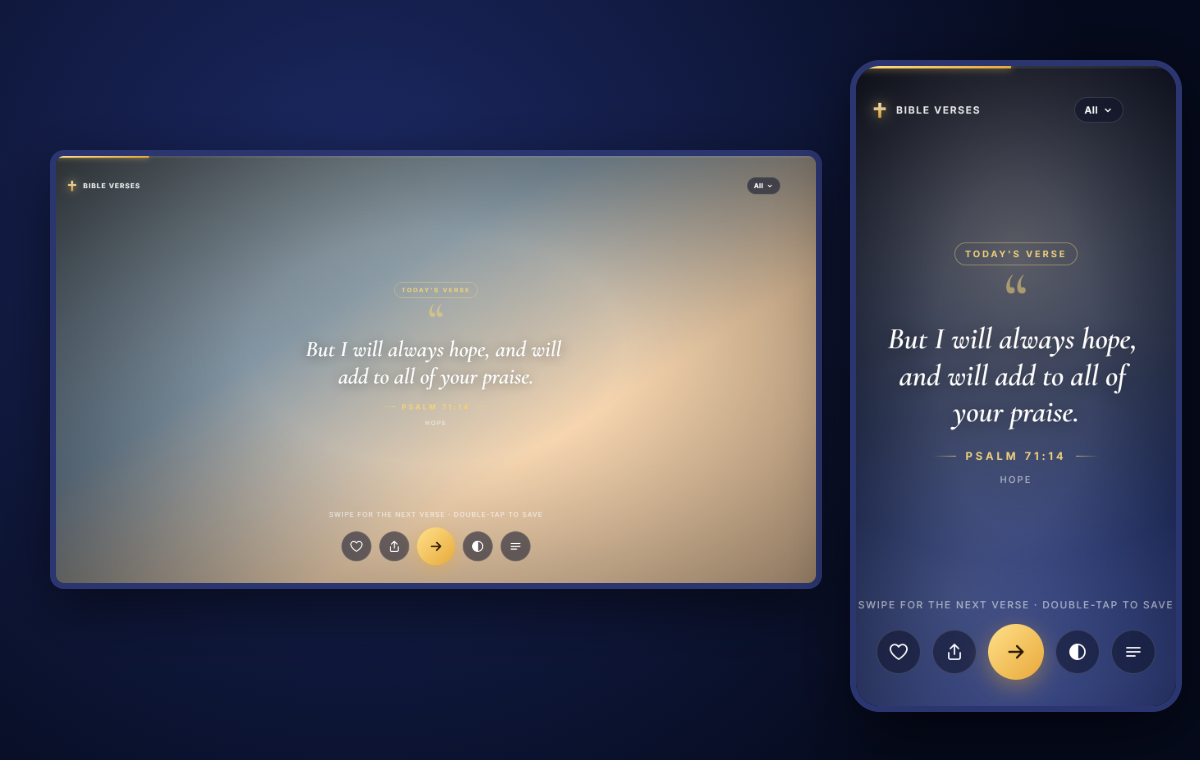
Scripture where you can see it
A verse you see many times a day settles into your mind. A changing screen keeps it fresh: one moment a word of comfort, the next a promise, a prayer or a command to be strong. Put it on a spare monitor or tablet, show it on a screen at home or in church, or save a favourite verse as the picture you see every time you pick up your phone or sit at your computer.
How it works
The app holds hundreds of verses in nine languages, arranged by topic. It paints soft, slowly moving colour scenes and fades from one verse to the next. Full-screen mode hides the buttons, asks your computer to keep the screen awake, and lets the verses run. Everything happens in your browser, so it works offline once installed and nothing about you is sent anywhere.
Want the real thing on your phone?
The free Android app sets the changing verses as your actual home and lock screen wallpaper. It is being prepared for Google Play. See all of our phone apps on the Megastore76 apps page.
Frequently asked questions
Is this Bible verse wallpaper really free?
Yes. There is no sign-up, no ads and no limit. It runs in your web browser and you can use it as often as you like.
What does it do?
It shows a Bible verse over soft, slowly moving colours and changes to a new verse on its own, every few seconds or minutes as you choose. Use it on a second monitor, a tablet on your desk, a church screen before a service, or simply open it for a moment of Scripture.
How do I use it as my computer wallpaper?
Windows and Mac cannot run a live web page as the desktop picture, so the app does the next best thing. Open the menu and choose “Download as a computer wallpaper” to save the verse you are looking at as a 1920×1080 picture, then set it as your desktop background. To see verses change on their own, use Full-screen mode on a second monitor or a spare screen.
Is there a phone version?
Yes. A free Android app with a true live wallpaper, which changes the verse on your home and lock screen, is being prepared for Google Play. This web version also saves any verse as a phone-sized picture you can set as your wallpaper today.
Which Bible translations does it use?
English, Spanish, French, Portuguese, German, Russian, Chinese, Vietnamese and Filipino. Each language uses a public-domain or openly licensed Bible. The Language page in the menu shows the translation and licence for each.
Can I choose the topic?
Yes. Pick a topic such as Hope, Peace, Strength, Comfort, Faith, Family, Prayer, Love, Guidance, Provision, Praise, Forgiveness or Wisdom, or leave it on All.
Can I save verses and share them?
Tap the heart, or double-tap, to save a verse. Saved verses are kept in your browser. The share button makes a picture of the verse that you can send to friends or post.
How do I make the verse change faster or slower?
Open the menu, choose “Auto-change & scenes”, and drag “Change verse every” anywhere from 5 to 120 seconds. You can also pick a fixed scene or let it change with every verse.
Is anything uploaded or tracked?
No. Everything runs inside your browser. Your saved verses, language and settings stay on your device. Nothing is sent to our servers or anyone else’s.
Can I install it like an app?
Yes. In Chrome or Edge use the install icon in the address bar, or on a phone choose “Add to Home screen”. It then opens in its own window and keeps working offline once installed.