Free volume leveler: no more loud adverts or sudden spikes
Keep the sound on one steady level. Share a browser tab such as YouTube, Netflix or live TV, or play your own file, and the leveller turns loud jumps down and lifts quiet speech, with live Before and After meters so you can see it work. Free, no sign-up, and nothing is uploaded.
- Evens out adverts and spikes
- Live before / after meters
- Private: nothing is uploaded
Open the volume leveler
Pick a tab or a file, choose a strength, and listen.
Open the volume levelerTab levelling works in Chrome and Edge on a computer. Playing a file works in most browsers. Installable as an app.
Like free tools that just work?
This leveller is one of several free Megastore76 tools. The pro catalogue has WordPress plugins, apps and guides: pay once, own forever.
How to use the Volume Leveler
- Click Open the volume leveler, then Level a browser tab (or Play a file).
- For a tab: open the leveller in the same Chrome as the tab you want, choose Chrome Tab, pick it, tick Share tab audio and click Share.
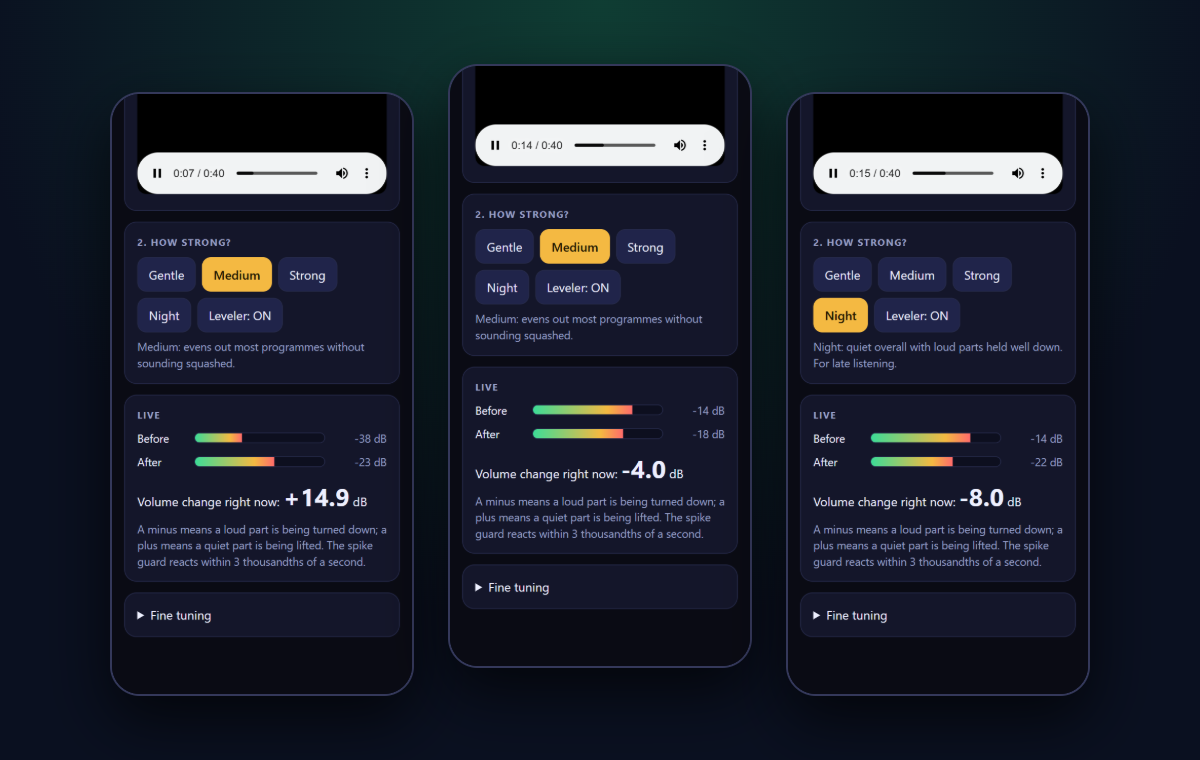
- Choose a strength: Gentle, Medium, Strong or Night.
- Watch the Before and After meters. The “Volume change right now” number shows how much the leveller is turning the sound up or down.
- Press Leveler: ON to switch it off and on, and compare the sound with and without it.
Why the volume jumps
Adverts are often mixed much louder than the programme around them. Action films go from whispers to explosions, and different channels or videos are recorded at different levels. A leveller watches the sound and moves the volume for you, a little at a time, so everything arrives at about the same loudness.
How it works
The leveller measures the loudness many times a second. When the sound gets louder than your target it turns it down quickly, and when it gets quieter it lifts it back up slowly. A short look-ahead guard catches sudden peaks such as a bang or a shout before they reach your ears, and quiet moments are left alone, so silence does not turn into hiss.
Level another tab on a computer
In Chrome or Edge, the leveller listens to a browser tab you choose to share, then plays it back through the leveller. Tick “Share tab audio” when you pick the tab. The tab is muted and its sound returns levelled. Nothing is recorded or uploaded.
Frequently asked questions
Is this volume leveler really free?
Yes. There is no sign-up, no ads and no limit. It runs in your web browser and you can use it as often as you like.
What does it do?
It keeps the volume on one steady level. Loud adverts, shouting and sudden bangs are turned down, and quiet speech or quiet music is lifted, so you stop reaching for the volume button.
Does it work with YouTube, Netflix and live TV?
On a computer in Chrome or Edge, yes. Choose “Level a browser tab”, pick the tab that is playing, and tick “Share tab audio”. The tab’s own sound is muted and replaced by the levelled sound from the leveller. Keep both tabs open.
Why is my tab not in the list?
The leveller must be open in the same Chrome as the tab you want to level. If you opened it as a separate app window with its own profile, it cannot see your other tabs. Open it as a normal tab instead.
Can I level my own music or videos?
Yes. Choose “Play a file” and pick an audio or video file from your device. It plays through the leveller. The file is read in your browser and is never uploaded.
Is anything uploaded or recorded?
No. All the processing happens inside your browser. Nothing is recorded, saved or sent to our servers or anyone else’s. Your chosen strength is remembered in your browser only.
Which strength should I choose?
Medium suits most programmes. Gentle is the lightest touch for music. Strong is for adverts and loud films. Night keeps everything quiet and calm, with a lower ceiling for late-evening viewing.
Will it make speech sound squashed or pumping?
It reacts in a fraction of a second to a sudden jump, but lets the level drift back slowly, so speech stays natural. Silence is never boosted, so you do not hear background hiss rise between sentences. Use the fine-tuning sliders if you want it gentler.
Does it work on a phone?
A web page cannot level the sound of other apps on a phone. A free M76 Volume Leveler Android app is being built for that. On a phone you can still use this page to level a file you play in it.
Can I install it like an app?
Yes. In Chrome or Edge, use the install icon in the address bar. It then opens in its own window and works offline once installed.