The Megastore76 Devotional Bible: read, study and draw near
A teaching Bible in your browser: a daily devotional for every day of the year, an introduction to every book, teaching notes as you read, and several translations to compare. Highlight, take notes, listen aloud, and install it to read offline. Free, with no sign-up.
- Daily devotional all year round
- Installable · works offline
- Private: nothing is uploaded
Open the Megastore76 Devotional Bible
Open today’s reading, or go straight to any book and chapter.
Open the Devotional BibleWorks in any modern browser on a computer, tablet or phone. Installable as an app.
Own the Devotional Bible: phone app + your own copy
Get the Android app for your phone or tablet, plus the complete app to run on your computer or host on your church website, with devotionals you can edit. Pay once, keep it.
How to use the Megastore76 Devotional Bible
- Click Open the Devotional Bible. The Today page shows the reading for today’s date: scripture, teaching, reflection questions and a prayer.
- Choose Read to open any book and chapter, and change the translation from the menu above the text.
- Tap a verse to highlight it, bookmark it, add a note or copy it. Find everything again under Saved.
- Press the speaker button to hear the chapter read aloud. Pick a voice and speed in Settings.
- Use Search for a word, or type a reference such as John 3:16 or Psalm 23.
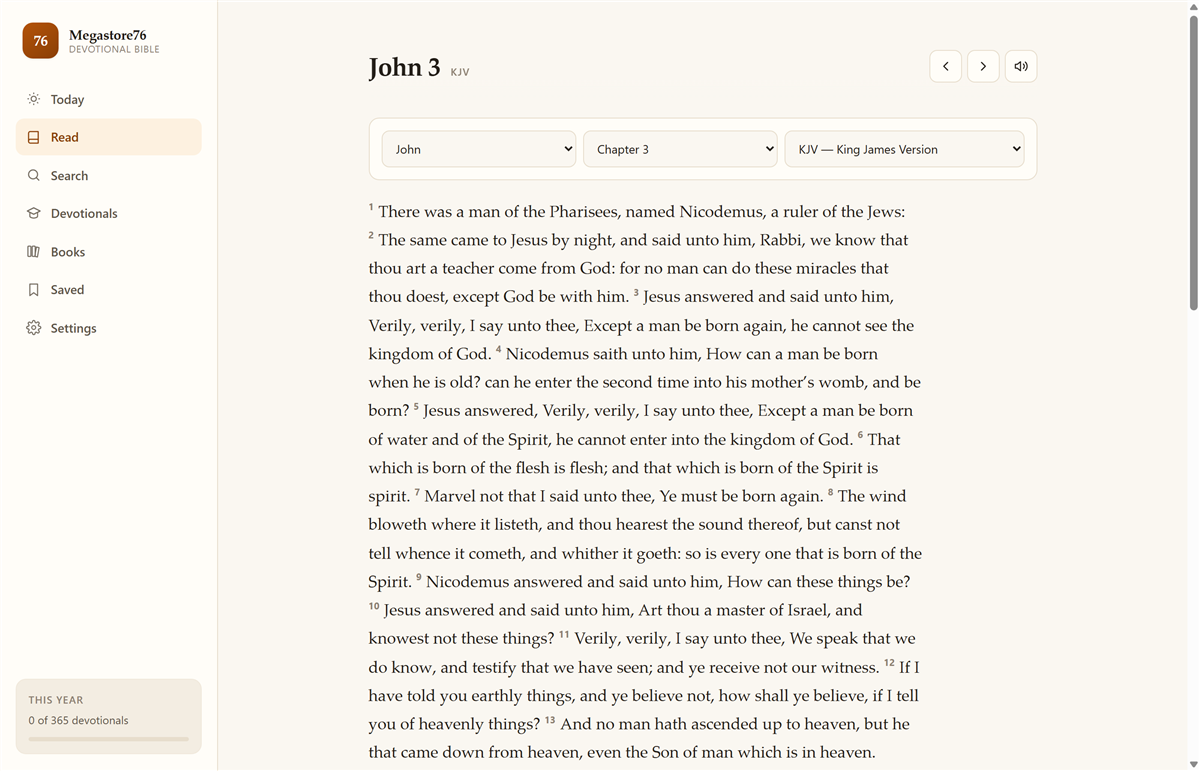
A Bible that teaches as you read
Reading the Bible every day is easier with a plan and a guide. Each day’s devotional takes one passage, explains it simply, asks a few honest questions and ends in prayer. When you open a book, its introduction tells you who wrote it, when, why, how it is laid out, and how it points to Christ. Teaching notes on key passages appear right beside the text.
Yours, on every device
The app runs in your browser and keeps the text on your device, so once it is installed it opens like any other app, even without a connection. Your highlights, notes and progress never leave your device.
Want to own it?
The full package includes the Android app for your phone or tablet and the complete app as files you can run on your computer or put on your church’s own website, with readings you can edit. See all of our phone apps on the Megastore76 apps page, and the author’s books on the Christian books page.
Frequently asked questions
Is the Megastore76 Devotional Bible free?
Yes. You can read it here in your browser for free, with no sign-up and no adverts. If you would rather own it — the Android app for your phone plus a copy you can run on your computer or host on your church website — the full package is available as a one-time purchase.
Which Bible translations are included?
The King James Version, the American King James Version, the World English Bible, the New Heart English Bible, the American Standard Version, the Bible in Basic English and Young’s Literal Translation. All are public domain. You can switch translation while you read without losing your place.
What is in the daily devotional?
Every day of the year, including 29 February, has a passage of scripture, a short teaching, questions to reflect on and a prayer. The Today page opens on the reading for the date, and the app keeps track of the days you have completed.
Does it work offline?
Yes. Once it has loaded, the app keeps the Bible text and the devotionals on your device. Install it (see below) and it opens even without a connection. Extra translations are saved the first time you open them.
Can I install it like an app?
Yes. In Chrome or Edge on a computer, use the install icon in the address bar. On an Android phone, choose “Add to Home screen” or “Install app” from the browser menu. On an iPhone, use Share → “Add to Home Screen”.
Can I highlight verses and write notes?
Yes. Tap a verse to highlight it in one of four colours, bookmark it, write a note or copy it with its reference. Everything you save is kept on your own device, under Saved.
Can it read the Bible aloud?
Yes. Press the speaker button on any chapter and it reads the chapter as continuous text. In Settings you can choose the voice and the speed from the voices your device provides.
Is anything uploaded or tracked?
No. There is no account. Your highlights, notes, bookmarks and reading progress stay in your browser on your device and are never sent to us.
Can my church use it on our own website?
Yes, with the paid package. It includes the complete app as ordinary web files you can upload to your own hosting, and you can edit the devotional readings for your congregation.